


Your phone rings while you’re on a job site. A homeowner wants a kitchen remodel. You scribble the name on a scrap of paper, promise to call back, then jump into a framing question, a supplier text, and a crew issue. By the end of the day, that lead is buried under receipts, notes, and half-finished estimates.
That’s how good jobs slip away.
For a lot of builders, the problem isn’t bad work. It’s messy follow-up. Leads come from your website, your Google Business Profile, referrals, phone calls, and form fills. Then they land in too many places. Some sit in your inbox. Some live in your head. Some get forgotten when the week gets busy.
That’s where crm software for builders starts to matter. Not as fancy tech. Not as another login to ignore. It acts as a digital foreman for your sales process. It knows who called, what they wanted, when your team last replied, and what needs to happen next.
And this isn’t just about being organized. Businesses investing in CRM achieve an average $8.71 return for every $1 spent, according to these CRM statistics. For a remodeler, that can mean fewer dropped leads, faster follow-up, and more signed contracts from the leads you already paid to get.
This image captures the feeling many owners know too well.

Table of Contents
- Introduction From Sticky Notes to Signed Contracts
- What Is CRM Software for Builders Really
- Key Benefits for High-Value Remodelers
- Must-Have Features and Powerful Integrations
- How to Choose the Right CRM Without Getting Lost
- Getting Started A Simple Implementation Plan
- The Final Piece Connecting Your Marketing and Sales
Introduction From Sticky Notes to Signed Contracts
A remodeler can run a clean job site and still have a messy sales process. That happens all the time. The work in the field looks sharp, but the office side looks like sticky notes, text threads, callback lists, and estimate drafts spread across three devices.
The trouble gets bigger when you chase higher-value jobs. A homeowner planning a major kitchen, addition, or whole-home remodel doesn’t just want a price. They want clear communication, steady follow-up, and confidence that your company has its act together.
A busy day turns into a lost opportunity
Say a lead comes in from your Google Business Profile while you’re meeting a cabinet rep. You miss the call. Later, the homeowner fills out a form on your website. Then your office manager writes the details in a notebook because the estimator was out. Nobody means to lose the lead. But nobody owns the full chain either.
A CRM fixes that by putting every lead in one place.
A good CRM acts like the clipboard hanging in the trailer. Anyone on the team can look at it and know what happened last, what comes next, and who’s responsible.
For builders, that matters because your sales cycle is long. A homeowner may talk with you, think it over, ask about budget, then come back weeks later. If your notes are scattered, you start over every time. If your CRM is organized, you pick up right where you left off.
It’s not “software first” thinking
A lot of owners hear CRM and think of some giant system built for corporate sales teams. That’s the wrong picture.
For builders, crm software for builders should feel simple. It should answer basic questions fast:
- Who is this lead: Name, project type, location, and budget notes
- Where did they come from: Website, call, referral, Google Business Profile, or ad
- What happened last: Call, text, site visit, estimate, or proposal
- What should happen next: Follow-up, appointment, revision, or contract
That’s it. If the system can’t help with those daily questions, it’s not helping your business.
What Is CRM Software for Builders Really
CRM stands for Customer Relationship Management. For a remodeling company, that means one system that keeps the full sales story straight, from the first call or Google Business Profile message to the signed agreement and clean handoff into production.
That definition matters more than it sounds.
On a high-value remodel, the sale rarely happens in one conversation. A homeowner asks about a kitchen addition, goes quiet for two weeks, comes back with new budget questions, then wants to review scope before committing. If those details live in one person’s phone, another person’s notebook, and a pile of email threads, the process starts to wobble. A CRM gives that process a set of shelves and labels.
Break the letters into plain English
Start with customer. In your business, that is not just a name and phone number. It is the homeowner, their project type, address, budget range, decision timeline, and the source that brought them in. Maybe they found you through your Google Business Profile. Maybe they came from a referral after seeing a finished basement you built for a neighbor. The CRM keeps that context attached to the right person.
Next is relationship. That is the history of the job before it becomes a job. Calls. Texts. Site visits. Notes about priorities. Questions about allowances. Concerns about timing. Changes in scope. If a prospect says, “We want to stay under a certain budget, but we care most about layout and storage,” that should not disappear after one meeting. A CRM keeps the conversation from resetting every time someone on your team picks it up.
Then comes management. This is the part busy owners usually care about most. Management means the next step is clear. Who needs a callback? Who is waiting for a revised estimate? Which lead came in from marketing and never got scheduled for a consultation? Which signed client is ready to move from sales into pre-construction? A CRM helps answer those questions without a scavenger hunt.
A CRM works like the front office version of a well-organized job trailer
On a jobsite, you work faster when tools, plans, and materials are where they belong. The same rule applies before the build starts.
A CRM organizes the sales side of the business so your team can find what it needs quickly and keep work moving. In one place, you can usually see:
- Lead records: Each inquiry gets its own file
- Communication history: Calls, emails, texts, and notes stay with that lead
- Pipeline stages: You can track where a prospect sits, from new inquiry to consultation to proposal to signed contract
- Task reminders: Follow-ups do not rely on memory
- Documents: Estimates, selections, photos, contracts, and plans stay tied to the right project
Practical rule: If your team keeps asking who last spoke to a homeowner, the process needs a better home.
For builders chasing larger remodeling projects, that home should cover more than basic contact management. It should connect the whole lead-to-closed-job workflow. A lead comes in from marketing. The system captures the source. Sales qualifies it. The estimator records site visit notes. The proposal gets sent. The client signs. Production gets the information without retyping everything into a second system.
That is why builder-focused platforms stand out. Software made for construction often combines lead tracking with estimating, scheduling, client communication, and project handoff. For example, Buildertrend presents itself as a platform built for home builders and remodelers, with tools for sales, project management, financial tracking, and client communication on its official features pages.
Some companies label that CRM. Some call it project management. For a remodeler selling $75,000-plus jobs, it is better to see it as the operating system for the pre-construction pipeline. It helps you connect marketing, sales, and the start of delivery without losing the thread.
Key Benefits for High-Value Remodelers
When you sell larger remodeling jobs, small mistakes get expensive. A missed callback can cost a six-figure project. A slow estimate can push a homeowner toward another contractor. A scattered handoff can make you look less polished than you really are.
You stop leaking leads
The first benefit is simple. You stop losing track of people.
If a lead comes in while you’re driving, on a ladder, or in a client meeting, the CRM catches it and stores it. That includes calls, web forms, and messages that would otherwise sit in different places. Instead of hunting through texts and voicemails, you open one record and see the whole picture.
That’s especially helpful for firms chasing fewer, bigger jobs. You don’t need hundreds of weak leads. You need to protect the strong ones.
You look more professional
Homeowners notice your process before they ever see your craftsmanship. Fast replies, clean notes, and organized communication tell them you’ll likely run the project the same way.
A CRM helps you respond consistently. The homeowner gets a message back. The appointment gets scheduled. Notes from the site visit don’t disappear. The estimate doesn’t sit untouched because one person got busy.
This is what better sales operations looks like in real life.

You move from estimate to contract faster
Speed matters. Not rushed, sloppy speed. Organized speed.
Construction CRM software like Buildxact can reduce project estimate generation time by 30%, according to Buildxact’s construction CRM guide. For a busy remodeler, that means you can get pricing in front of a homeowner faster and keep the conversation warm while they’re still engaged.
Think about the difference between these two businesses:
- Builder A: Handwrites notes at the site visit, re-enters them later, searches old pricing sheets, and sends the estimate after a long delay.
- Builder B: Uses a CRM tied to estimating, stores scope details in one place, and moves the lead forward while the details are still fresh.
The second builder often feels easier to hire. Not because the work is better yet, but because the process feels safer.
Homeowners buying a major remodel aren’t just choosing a price. They’re choosing the company that makes the project feel manageable.
That feeling matters for kitchen remodels, additions, baths, and outdoor living work where the homeowner is making a big decision with a lot of moving parts.
Must-Have Features and Powerful Integrations
Not every CRM is useful for a builder. Some are too generic. Some are packed with tools you’ll never touch. You want the basics done well first.
This infographic gives a simple view of the core pieces.
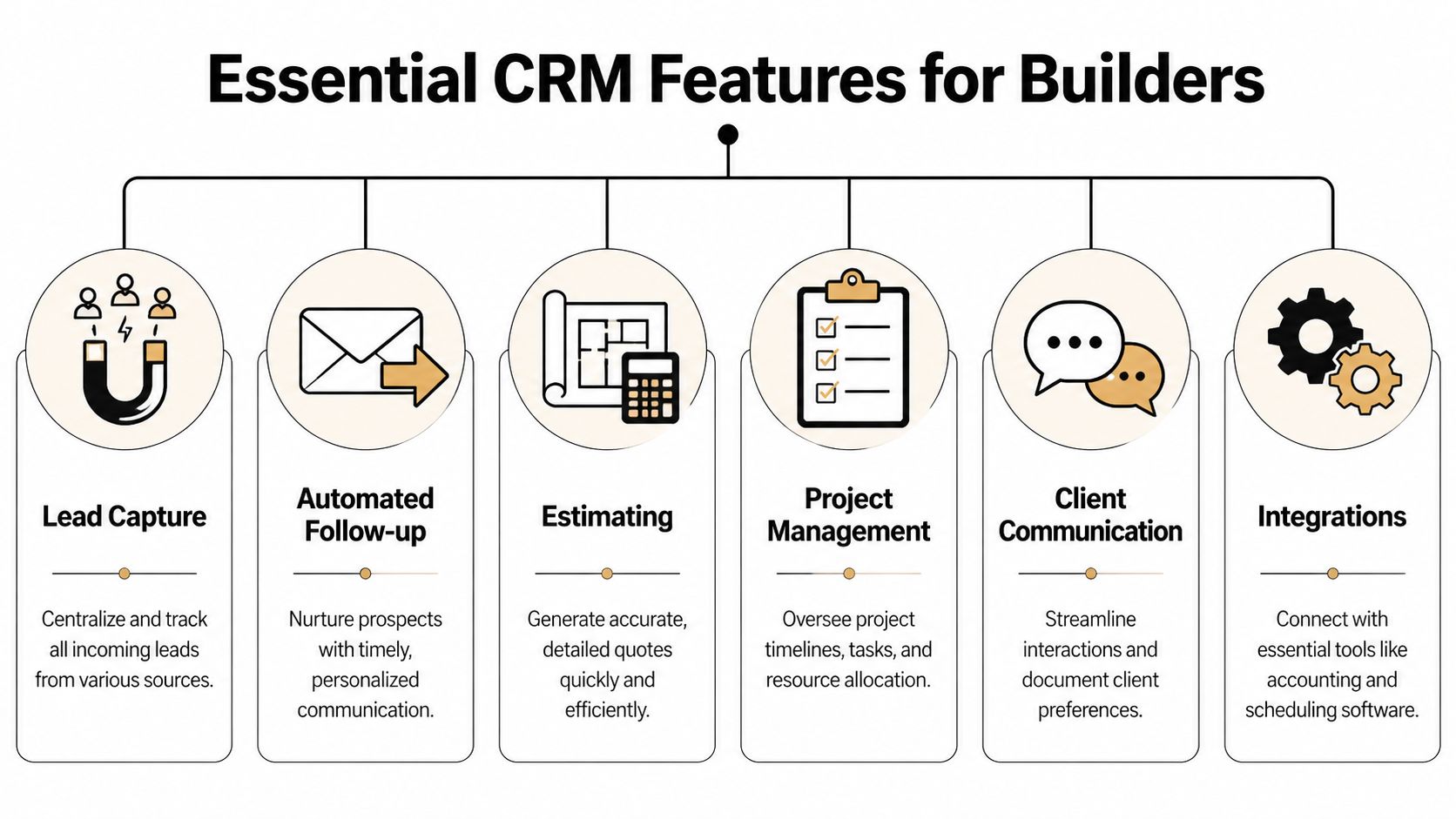
The tools inside the box
Here are the features that matter most in day-to-day builder work:
- Lead capture: Every phone call, form fill, and message should land in one place. If leads start in five places, people get missed.
- Automated follow-up: If someone reaches out after hours, the system should help you reply, confirm receipt, or queue the next step.
- Estimating support: You need a place to store scope notes, pricing details, and proposal drafts without jumping between too many tools.
- Scheduling: Site visits, callbacks, and sales meetings need a calendar tied to the lead record.
- Client communication: Texts, emails, and notes should stay attached to the homeowner so your team isn’t guessing.
- Project handoff: Once the job is sold, the production side should inherit the history instead of starting from zero.
A simple test helps here. If the software can’t follow a lead from first call to signed agreement, it’s not a full sales system for a remodeler.
Integrations are bridges
An integration is just a bridge. It lets one tool talk to another without you copying the same information over and over.
That matters because builders already use several systems. You may use QuickBooks for money, a calendar for appointments, a call tool for missed calls, and a website form for incoming leads. If those tools don’t connect, your office staff becomes the bridge.
Bi-directional integrations that connect your CRM to other tools like QuickBooks can cut administrative overhead by 40-50% by eliminating double-entry of customer and job data, according to SPOTIO’s construction CRM article.
That’s a big deal for a small team.
Builder shortcut: Every time someone retypes a customer name, address, or job detail into a second system, you’ve created another place for mistakes.
Why marketing connection matters
Many builders get stuck at this point. They buy a CRM that tracks leads, but it doesn’t connect well to the places leads originate. That means your website, forms, ads, Google Business Profile, calls, and texts still live on separate islands.
A better setup ties those pieces together so a new lead flows straight into the CRM, kicks off follow-up, and shows up on your pipeline board. If you want a simple look at how that kind of connected system is evolving, CRM reimagined for the AI age offers helpful context around modern CRM expectations.
Your website plays a big role too. A good site shouldn’t just look nice. It should capture leads cleanly and pass them to the right place. This guide on turning your website into your best salesman explains that idea in builder-friendly language.
How to Choose the Right CRM Without Getting Lost
A remodel lead comes in from your Google Business Profile on Tuesday. Your office gets the voicemail. The estimator gets a text. A note lands on a sticky pad. By Friday, nobody is fully sure who called the homeowner back.
That is the test your CRM needs to pass.
For a high-value remodeler, the right system is not just a contact list with nicer screens. It should carry one job from first inquiry to signed contract, then hand the baton cleanly to production. If the software cannot connect marketing, sales follow-up, and project handoff, you are buying another pile of digital sticky notes.
Start with your real workflow
Open a blank page and sketch your sales process like a job blueprint.
Write down where leads come from, who responds first, what qualifies a good prospect, when you schedule site visits, how estimates move forward, and what happens after the client says yes. If you are investing in lead generation for contractors, your CRM should show whether those leads turned into consults, estimates, and signed jobs. Otherwise, you can see traffic, but not results.
This keeps you from shopping by feature list alone.
Ask builder questions, not software questions
A useful CRM should answer plain jobsite questions.
Can an estimator update it from a truck between appointments? Can your office manager see every call, text, note, and file for one homeowner without opening five tabs? Can a lead from your website or Google Business Profile create a record automatically and land in the right sales stage? Can the signed job move into project management without someone retyping everything?
Pricing matters too, but only in context. Builder-focused platforms often charge more than general-purpose CRMs because they include estimating, scheduling, selections, change orders, or client communication tools in the same system. The core question is whether the monthly cost replaces enough manual work and missed follow-up to justify itself.
If you want a simple buying framework before booking demos, this guide on how to evaluate a software gives a practical way to compare options.
Vendor selection checklist
| Question | Why It Matters |
|---|---|
| Does it capture leads from my website, Google Business Profile, forms, and calls? | High-value jobs often start with one inquiry. You need that lead to enter the pipeline without manual copying. |
| Can it match my actual sales stages? | Kitchen remodels, additions, and whole-home projects have longer sales cycles and more decision points. |
| Can my team use it from the field and the office? | A tool that only works well at a desk usually ends up half-used. |
| Does it show the next action for every open opportunity? | Expensive jobs are often lost through slow follow-up, not bad craftsmanship. |
| Can it store notes, photos, files, and communication in one homeowner record? | Your team needs one job folder, not scattered scraps. |
| Does it connect with accounting or project management tools? | Signed jobs should move forward without re-entering customer and scope details. |
| Is pricing clear as my team grows? | You need to know what happens when you add users, projects, or advanced features. |
| Is support easy to reach and easy to understand? | Busy crews need straight answers, not software jargon. |
One more filter helps. During a demo, ask the rep to show one complete path: lead captured, follow-up scheduled, estimate tracked, contract signed, then project handed off. If they can only show isolated features, you may be looking at a toolbox full of shiny parts without a working plan.
Pick the CRM your team can use during a busy Wednesday afternoon, while calls are coming in and jobs are moving. That is the real test.
Getting Started A Simple Implementation Plan
A busy remodeler does not need another software project. You need a working system that catches every good lead, keeps the sales process moving, and hands signed jobs to production without details getting lost.
The easiest way to get there is to build your CRM the same way you would set up a job site. First clear the space. Then bring in the tools you will use first. Then teach the crew where everything goes.
Step one prep the job site
Start with the records tied to active revenue, not every contact you have collected over the years.
Pull together recent leads, open estimates, active opportunities, and past clients worth staying in touch with. Clean up duplicate names. Fix bad phone numbers and missing emails. Group leads by source if you can, especially calls, website forms, referrals, and Google Business Profile inquiries. For a high-value remodeler, that source data matters. It shows which marketing channels bring in the kinds of homeowners who sign $75k-plus projects.
Keep the first import simple. You are building a clean workbench, not a museum archive.
Step two build one repeatable path
Start with one complete workflow from inquiry to signed job.
For many builders, that path looks like this: a lead comes in, the CRM creates the homeowner record, assigns follow-up, tracks the consultation, stores estimate notes, and marks the deal won when the contract is signed. After that, you can add the handoff to project management so the production team receives the full job history instead of starting from scratch.
That order matters. If your CRM only stores contacts, it becomes a digital pile of business cards. If it manages the full lead-to-closed-job process, it works like a set of labeled job folders that move from sales to production without paperwork getting scattered.
If you want a plain-English rollout template, this CRM implementation project plan is a helpful reference.
Step three train for real life
Do not train the team with abstract feature tours. Use one real lead, one real estimate, and one real next step.
Show the office manager how a missed call becomes a contact record. Show the salesperson how to log a site visit and schedule follow-up. Show the project manager what information should be waiting there once the contract is signed. Busy crews learn faster when they can see the handoff, like reading the same set of blueprints instead of passing around separate sketches.
Keep the first scoreboard short:
- Lead capture: Are calls, forms, and referrals landing in the CRM?
- Response time: Is someone assigned to follow up quickly?
- Sales progress: Can you see which estimates are active, stalled, or signed?
- Handoff quality: Does production receive notes, files, and scope history without re-entry?
- Referral potential: Are past clients easy to revisit for future work and introductions?
As noted earlier, CRM use often improves retention and follow-up consistency. For a remodeler, that usually shows up in fewer forgotten leads, cleaner communication, and more referrals from homeowners who had a good experience from first call to final contract.
Your pipeline still needs fresh opportunities coming in. If you want to strengthen the top of the funnel while you set up the system, this guide to lead generation for contractors pairs well with your CRM rollout.
The Final Piece Connecting Your Marketing and Sales
A lot of CRM articles stop too early. They talk about tracking leads after they show up. But they skip the part that causes many of the leaks in the first place.
The missing link in most setups
Most builders struggle with tool fragmentation, leading to lead loss because their CRM isn’t properly connected to marketing tools like Google Business Profile and automated text-back systems, according to this industry analysis on construction CRM software.
That means a lead might come from Google, hit a form tool, trigger an email somewhere else, and never get logged properly in the CRM. You have tools, but they don’t move like one crew.
That’s like sending your team to a remodel with the drawings in one truck, the materials in another, and the address in somebody’s pocket.
One system beats five disconnected tools
The strongest setup ties marketing, follow-up, sales, and handoff together. A homeowner finds you through local search, calls or fills out a form, enters the CRM instantly, gets a fast response, moves through the sales pipeline, and lands in project management with the full history attached.
That’s the promise of crm software for builders. Not just contact storage. Not just reminders. One clear path from stranger to signed client.
If you want to improve the top end of that path, this guide to general contractor marketing is worth reading because it helps explain how local visibility and lead capture feed the whole system.
A CRM by itself can organize your shop. A connected CRM can help your business feel coordinated from the first click to the final signature.
If you want help building that kind of connected system, Constructo Marketing focuses on remodelers who want stronger local visibility, better lead capture, and a sales process that doesn’t let good opportunities fall through the cracks. Their approach brings marketing and CRM together so your leads don’t stop at the phone ring.