


You know the feeling. Your crew just wrapped a gorgeous kitchen. The tile lines are dead straight, the lighting looks custom, and the homeowner is thrilled. Then a prospect in your town searches “kitchen remodeler near me” and hires the contractor with the weaker portfolio, weaker process, and weaker reputation, because that company showed up first on Google Maps.
That stings because it’s not a craftsmanship problem. It’s a visibility problem.
Google Maps is the modern version of the best storefront in town. If your remodeling company shows up high, homeowners find you when they’re ready to buy. If you don’t, you stay invisible while less qualified competitors scoop up the calls. The good news is that how to rank higher on google maps isn’t magic. It’s a system. And for remodelers chasing serious residential projects, that system has to connect ranking with trust, follow-up, and sales.
Table of Contents
- Why Your Great Work Isn't Getting Seen on Google Maps
- Build Your Unbeatable Google Business Profile
- Earn Trust with Photos and Customer Reviews
- Show Google You're The Local Remodeling Expert
- Turn Your Ranking Into Real Jobs with Smart Tools
- How to Know It's Working and Fix Common Issues
Why Your Great Work Isn't Getting Seen on Google Maps
A lot of remodelers think Google Maps is just a directory. Put your name in, add a phone number, and wait. That’s why they stay buried.
Google doesn’t reward “being listed.” Google rewards clear signals. It wants to show the contractor that looks real, active, relevant, and trusted. If your profile is half-finished, your service pages are thin, your reviews come in randomly, and your photos are stale, Google has no reason to put you at the top.
Think of Google like a parent picking the safest babysitter. That parent doesn’t choose the person who only raises a hand. They choose the one with the clean record, strong references, clear experience, and proof they’ve done the job well before. Homeowners do the same thing when they search for a remodeler.
Google Maps isn’t a popularity contest. It’s a trust contest.
This is why great builders lose online to average marketers. The average marketer understands signaling. The great builder assumes quality alone will carry the day. It won’t. Not on Maps.
Here’s the simple version:
- Your Google Business Profile tells Google what you are.
- Your reviews and photos prove you do the work.
- Your website pages prove where you do it.
- Your follow-up system turns ranking into revenue.
If one piece is weak, the whole machine slows down. If all four work together, your company starts showing up like the obvious local choice.
That’s the shift. Stop treating Maps like a chore. Treat it like your online showroom on the busiest road in town.
Build Your Unbeatable Google Business Profile
Your Google Business Profile is your digital business card, storefront, and front desk rolled into one. If it’s sloppy, homeowners bounce. If it’s dialed in, Google understands your business faster and prospects trust you faster.
Get the basics perfectly matched
Start with the boring stuff. It matters more than most remodelers want to admit.
Your name, address, and phone number need to match everywhere your business appears online. Your website, directories, social profiles, and Google Business Profile should all say the same thing in the same way. Don’t make Google guess whether “ABC Renovations,” “ABC Renovations LLC,” and “ABC Kitchen & Bath” are the same company.
Fill out every relevant field in your profile:
- Business name: Use your real operating name.
- Phone number: Use the main local number you want leads to call.
- Website: Point it to the correct site, not an old landing page.
- Hours: Keep them current.
- Services: List the actual services you want to rank for, like kitchen remodeling, bathroom remodeling, home additions, and outdoor living.
If you want a practical walkthrough, use this Google Business Profile checklist for remodelers.
Choose the category that matches the job you want
This is the biggest decision inside your profile. Most contractors get it wrong.
According to Whitespark’s 2026 local search study summarized by Ahrefs, the primary Google Business Profile category is the top ranking factor for Google Maps, influencing 28.5% of local pack variance. The same source says businesses that switched to hyper-specific primary categories saw a 42% average position improvement in 90 days.
That means “Remodeling service” is often too broad if your real target is premium kitchen work. If you want kitchen jobs, choose the category that says kitchen. If you want bath jobs, choose the category that says bath. Speak clearly so Google doesn’t have to translate.
A simple way to understand this is:
| What you tell Google | What Google hears |
|---|---|
| General contractor | This company does a little of everything |
| Remodeling service | This company remodels, but I’m not sure what |
| Kitchen remodeler | This company is a kitchen specialist |
Specific beats vague.
Then add a few secondary categories that support your real offers. Don’t stuff the profile with every category under the sun. You’re trying to look accurate, not desperate.
Practical rule: Pick the category that matches the work you most want more of, not the work you used to do.
Set service areas like a pro
A lot of remodelers serve multiple suburbs but don’t have a flashy office in every town. That’s normal. If you operate as a service area business, set your service area to reflect where you work.
This matters most in suburban markets where homeowners are spread out. Your profile should tell Google which towns and neighborhoods you serve, and your settings should line up with your real-world footprint. If you hide your address because you’re a service area business, keep the rest of the profile even cleaner and more complete.
Don’t claim places you never serve. Don’t stretch so wide that your profile starts looking fake. Be honest and strategic.
A good profile does one thing really well. It makes it easy for Google and homeowners to answer the same question: “Is this the right remodeler for this job in this area?”
Earn Trust with Photos and Customer Reviews
A homeowner opens your Google Business Profile after looking at two or three remodelers in the same area. Prices look similar. Promises sound similar. Your photos and reviews decide who gets the call.
For high-ticket remodeling, trust has to show up fast. Nobody hires a stranger for a $75K kitchen because the profile was filled out correctly. They hire the remodeler who looks proven, current, and safe to invite into their home.

Reviews are your report card
Reviews do two jobs at once. They help Google trust your business, and they help a homeowner justify reaching out for a serious project.
Random review collection is weak. A repeatable system wins.
Ask at the peak moment. For remodelers, that is usually right after the final walkthrough, once the punch list is complete and the client is smiling in the finished space. Waiting a week cuts your response rate. Asking before the dust settles invites lukewarm feedback.
Be specific in the request. A good review mentions the actual project, the experience, and the result. If you finished a primary bath in Naperville, a natural review might mention the bathroom remodel, your communication, and the town. That kind of detail helps your profile look real instead of generic.
Use a simple process your team can follow every time:
- Close the job cleanly: Do not ask while small issues are still hanging around.
- Ask the same day: The emotional high point is short.
- Send the direct review link: Remove every bit of friction.
- Reply to every review: Show prospects you pay attention after the contract is signed.
Replies matter because homeowners read them. A calm, professional response to praise or a complaint says more about your company than a polished slogan ever will.
If you want a closer look at the ranking side, read this guide on how Google reviews help SEO.
Photos are your proof
Photos sell the job before the estimate appointment.
A homeowner comparing remodelers wants evidence. Clean tile lines. Tight trim work. Smart layouts. Finished spaces that look expensive and lived in, not staged to hide mistakes. Your photo gallery should answer the silent question every serious buyer asks: “Can these people handle a project this big without making a mess of my house and my money?”
Upload the photos that reduce doubt:
- Finished project photos that show quality and style clearly
- Before and after sets that make the transformation obvious
- In-progress shots that show process, protection, and organization
- Team photos that make the company feel established and accountable
- Exterior and interior shots connected to real projects in your service area
Fresh photos help too. An active profile looks like an active company. A profile full of old images looks neglected, even if your crew is busy every day.
Treat your photo strategy the same way smart agents treat listing media. The same principle shows up in these proven real estate marketing strategies. Visual proof lowers hesitation and gets more people to take the next step.
The mistake I see all the time is posting pretty pictures with no system behind them. The better move is to tie photos and reviews to your job pipeline. Finish a project, upload fresh images, request the review, log it in your CRM, and follow up on the lead flow that comes from it. That is how a Google Maps profile stops being a directory listing and starts working like a machine for bigger remodeling jobs.
Show Google You're The Local Remodeling Expert
Your Google Business Profile can open the door. Your website decides whether Google sees you as a specialist or just another contractor with a listing.
If your website has one generic services page and a contact form, you’re leaving authority on the table. Google wants context. It wants to understand what you do and where you do it. Remodelers need to make that obvious.

Build digital brochures for each service and town
Think of each service page like a digital brochure for one thing you do. Think of each location page like a brochure for where you do it. If you want to rank for kitchen remodeling in a specific town, build a page that’s about kitchen remodeling in that town.
Not fluff. Real content.
Good pages for remodelers usually include:
- The service itself: kitchen remodels, bathroom remodels, additions, outdoor living
- The place: the city, suburb, or service area you want to target
- Proof: project photos, process details, FAQs, and local context
- Strong internal linking: pages should connect logically, not float alone
This is the same idea used in other local industries. If you want a parallel example outside remodeling, some of these proven real estate marketing strategies show how niche service providers build local relevance by matching content to buyer intent.
Use the Core 30 recipe
A structure I like for remodelers is the Core 30 approach. It’s simple enough to follow and strong enough to build real topical authority.
The method involves creating 30 optimized service and geo pages with strong internal linking, and it has been shown to improve Google Maps rankings from #17 to #2 in as little as two weeks for local service businesses, leading to a major increase in calls, based on the case shared in this Core 30 overview.
For remodelers, that often means building around three buckets:
| Bucket | Example page type | Why it matters |
|---|---|---|
| Core services | Kitchen remodeling, bathroom remodeling | Tells Google what you do |
| Specific offers | Luxury shower remodels, room additions | Captures tighter intent |
| Geo pages | Kitchen remodeling in Plano | Tells Google where you do it |
The first-grader version is this: if Google is a librarian, your website needs labeled shelves. Don’t throw every book in one pile and expect the librarian to know where things go.
A thin website makes a strong Google profile weaker. A focused website makes that profile stronger.
The contractors who dominate Maps usually don’t have one “Services” page. They have a clean set of pages that match the jobs they want to sell.
Turn Your Ranking Into Real Jobs with Smart Tools
A high ranking feels great. It doesn’t pay the bills by itself.
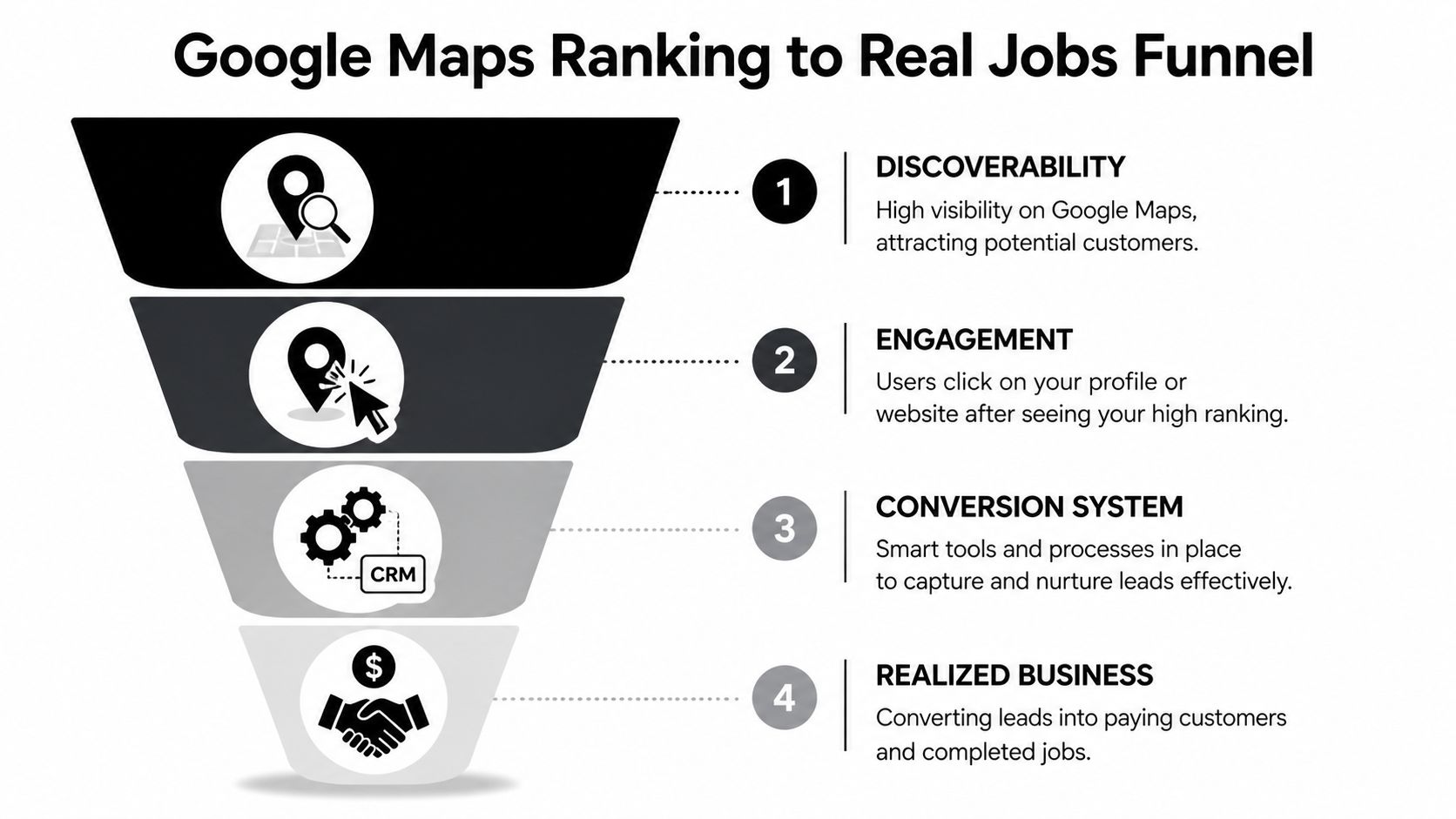
If your office misses calls, your web leads sit untouched, or your follow-up is patchy, your Google Maps work becomes expensive busywork. Ranking is the top of the funnel. Revenue happens lower down.
A ranking without follow-up is wasted
Think of a CRM like a super-smart receptionist who never goes to lunch, never forgets to text back, and never loses a sticky note. That matters when you’re handling high-ticket jobs.
The review data matters here too. The same analysis of 8,000-plus businesses found that contractors collecting 4 to 5 reviews monthly beat competitors with sporadic review activity, and that a CRM can help systematize that process. In plain English, your sales system can help your ranking system.
That’s why I push remodelers to connect Maps with operations:
- Missed-call text-back: If you miss the call, the lead still gets an immediate response.
- Lead tagging: Know whether the lead came from Maps, website SEO, ads, or referral.
- Automated follow-up: Homeowners get reminders without your office chasing every task manually.
- Review requests: Trigger them after project completion, not at random.
If you’re comparing tools, this overview of CRM software for builders gives a solid starting point. One option in that category is Constructo Marketing’s whitelabeled GoHighLevel setup, which is built around lead tracking, automated follow-up, and missed-call text-back for contractors.
Use ads and automation together
Organic Maps rankings take work. Ads can bring speed.
For remodelers, Google Local Service Ads can act like a fast pass. They help you appear in front of high-intent homeowners while your profile, reviews, content, and citations gain traction. I don’t treat ads as a replacement for local SEO. I treat them like temporary scaffolding while the permanent structure goes up.
This is also where conversion matters. Traffic that doesn’t turn into appointments is just noise. If you want a strong outside resource on turning more visits into actions, this piece on enhancing sales with conversion strategies is useful because it focuses on what happens after the click.
A clean system looks like this:
- Google Maps gets you seen
- Your profile gets the click
- Your CRM captures the lead
- Your sales process books the appointment
- Your review workflow feeds the ranking loop again
That’s the machine. Not a trick. Not a hack. A machine.
How to Know It's Working and Fix Common Issues
Most remodelers track the wrong stuff. They obsess over rank screenshots and ignore whether the phone is ringing with the right kind of homeowner.
The point of learning how to rank higher on google maps isn’t to admire your listing. The point is to win more good-fit jobs. So measure business signals, not vanity signals.
Track the signals that lead to jobs
Start with the actions that show buyer intent inside your Google Business Profile and website reporting.
Pay attention to:
- Phone calls: Are qualified homeowners calling from Maps?
- Website clicks: Are searchers moving from the profile to your site?
- Direction requests: Useful when you have a public office or showroom
- Form submissions: Are visitors turning into consultations?
- Booked appointments: At this stage, marketing becomes pipeline
A simple scorecard helps. Review it monthly, not once a year when work dries up.
| Metric | What it tells you | What to do if it’s weak |
|---|---|---|
| Calls | Profile and offer are compelling | Improve category, reviews, and call handling |
| Website clicks | Searchers want more info | Strengthen photos, services, and description |
| Consultations | Lead quality and conversion | Improve forms, follow-up, and sales process |
| Closed jobs | Actual business impact | Audit the whole pipeline |
If rankings go up but booked consultations don’t, you don’t have a visibility problem anymore. You have a conversion problem.
Fix citation and service area problems fast
One of the most common Google Maps problems is inconsistent business info across the web. Your business may be listed on directories, old chamber pages, social profiles, and contractor sites with outdated details. That confuses Google.
Treat citation cleanup like a game of finding every version of your company online and correcting it. Your name, address, phone number, and website should match your current business details everywhere possible.
For service area businesses, another issue is bad setup. Hiding a business address while expanding service areas to affluent neighborhoods can improve “near me” rankings for service area businesses, and recent trends show that businesses with optimized 10 to 20 mile service radii can achieve 2 to 3 times higher local pack visibility, according to Map Ranking.
That doesn’t mean you should sprawl recklessly. It means you should define a service radius that matches reality and your best job opportunities.
Watch for these common mistakes:
- Old phone numbers still floating around online
- Different business names on different platforms
- Service areas that are too broad to be believable
- Thin location pages with no local substance
- No process for updating listings after a move, rebrand, or number change
If you clean those up and keep your profile active, Google gets a cleaner picture of your business. And when Google has a cleaner picture, you usually get better placement and better leads.
If you want help building the full system, not just tweaking one listing, Constructo Marketing works specifically with remodelers to connect Google Maps visibility, local SEO, paid traffic, websites, and CRM follow-up into one lead-generation process aimed at real residential projects.