


You finish a kitchen remodel, send the last invoice, and think, “That was a good job.” The clients are happy. The photos look great. The crew stayed busy. But a few weeks later, your bank account doesn’t look the way you expected.
That feeling messes with a lot of remodelers.
On paper, the project looked profitable. In real life, the money feels thinner than it should. Maybe the tile upgrade wasn’t tracked cleanly. Maybe the labor hours drifted. Maybe three little client requests turned into one big margin leak. That’s where construction job cost accounting stops being “accounting stuff” and starts becoming survival stuff.
If you run residential remodeling jobs in the $75K–$300K range, you’re in a different world than a big commercial contractor. Your jobs are personal. Clients change selections. Scope moves midstream. Tiny misses stack up fast. Job costing gives each project its own scoreboard, so you can see what’s really happening before profit slips away.
Table of Contents
- Why Your Gut Feeling on Profit Is Wrong
- What Is Job Costing Really A Simple Analogy
- The Building Blocks Your Chart of Accounts
- How to Measure Progress WIP and Percent Complete
- Your Job Costing Workflow From Estimate to Final Report
- Key Reports and Numbers That Actually Matter
- Common Mistakes and Recommended Software for Remodelers
Why Your Gut Feeling on Profit Is Wrong
Most remodelers know the feeling. A project felt busy, productive, and successful, so you assume it made money. Then you look closer and the result is muddy.
That’s because your gut usually measures activity, not profit.
Residential remodeling has a sneaky problem. The project starts one way, then the homeowner wants a different faucet, then a larger shower niche, then better cabinet hardware, then a layout tweak. None of those changes feels huge in the moment. Together, they can unravel the budget. According to SVA’s breakdown of common job costing issues for construction companies, client-driven scope changes on residential remodeling projects in the $75K–$300K range can erode 15-25% of projected profits, and remodelers without a system to capture those changes often underbid by 10-20%.
Your checking account is not a job report
A lot of owners run the business by looking at cash in the bank. I did that too. The problem is simple. Cash tells you whether money moved. It doesn’t tell you whether a specific kitchen, bath, or addition made money.
You can be cash-positive today and still have a losing job hiding in the background.
When you don’t track each change, allowance adjustment, and extra labor hour to the job itself, the project can look healthy right up until the profit is gone.
Material swings make this worse. If you want a practical look at how pricing drift shows up inside a project, Retriever's material cost control insights are worth reading. They connect the everyday purchasing chaos remodelers deal with to the need for cleaner cost tracking.
Profit fade is usually a system problem
Many owners often beat themselves up for “missing something.” Usually, it’s not a discipline problem. It’s a system problem. Your company may have decent bookkeeping and still have weak job costing.
That difference matters because construction businesses already run on tight margins. If you want a plain-English look at why margin discipline matters so much for contractors, this guide on construction profit margin is a helpful companion.
Job costing gives every project its own financial map. It tells you what the job was supposed to cost, what it’s costing now, and whether the finish line still holds profit. Without that map, you’re driving by feel.
What Is Job Costing Really A Simple Analogy

A client approves a $180,000 kitchen remodel. Cabinets get upgraded halfway through. The electrician finds old wiring that needs extra work. Appliance specs change twice. By the end, money went out all over the place, but one question still matters most. Did that kitchen make you money?
That is job costing.
Let’s compare it to baking a cake. Your bookkeeping tracks the full grocery bill for the month. You can see money spent on eggs, flour, sugar, butter, and milk. Helpful, yes. But that monthly total cannot tell you what one birthday cake cost, or whether you priced it high enough to make a profit.
Job costing is the recipe card for one specific cake. In remodeling, it is the cost record for one specific job.
Company books show the business. Job costing shows the job.
General accounting answers broad questions such as:
- How much cash came in this month
- What did we spend on payroll
- Did the company make money overall
Job costing answers the questions that keep a remodeler up at night:
- Did this kitchen remodel make money
- Did cabinet installation labor run over the estimate
- Did client selections push materials past the allowance
- Did change orders cover the extra work, or did the job absorb it
That difference matters a lot for residential remodelers doing $75K to $300K projects. On a custom home or a tower, teams often have more layers of admin and more room to spread overhead. On a kitchen, bath, or whole-home remodel, a few missed labor days, one underpriced stone template, or a sloppy allowance can eat the margin fast.
Job costing gives each project its own scorecard, so a busy month does not hide a weak job.
A kitchen remodel is a recipe with a lot of ingredients
Say you run two jobs at the same time. One is a hall bath. The other is a high-touch kitchen with multiple client selections, custom cabinets, and several change orders. If both jobs feed into one big pile of labor and material spending, you lose the trail.
You need to know what belongs to each job, and often what belongs to each phase inside that job.
For a remodeler, the “ingredients” usually include:
- Labor for demo, framing, drywall, trim, punch work
- Materials such as cabinets, flooring, fixtures, tile, paint
- Subcontractors such as plumbing, electrical, HVAC, stone fabrication
- Other job costs such as permits, dumpsters, equipment rental, and selection overruns
Here is the plain-English version. If a cake turns out dry, you check the recipe, the oven temperature, and the ingredient amounts. You do not stare at the whole pantry and hope an answer appears.
Job costing works the same way. It gives every dollar a job name, a cost bucket, and a place in the story. That is how you spot where profit was earned, where it leaked out, and whether that “good-looking” kitchen remodel was worth the effort.
The Building Blocks Your Chart of Accounts
A chart of accounts is the filing system behind your numbers. If the filing system is messy, the reports look busy but they do not help you make better decisions.
For a residential remodeler, this matters fast. A $140,000 kitchen with custom cabinets, owner-supplied fixtures, and three change orders creates a lot of moving pieces. If those costs all land in broad, sloppy categories, you cannot tell whether the profit came from good production, a favorable allowance, or a billing mistake.
Your chart of accounts works like the aisle map in a hardware store stockroom. The aisles are the big categories. The cost codes are the shelf labels inside each aisle. That structure lets you put every receipt, time entry, and subcontractor bill in the right place.
Why structure matters on smaller remodel jobs
Large commercial jobs can hide mistakes for a while because there is more volume and more room to spread overhead. A kitchen, bath, addition, or whole-home remodel does not give you that cushion. One missed week of labor, one poorly tracked stone allowance, or one change order coded to the wrong bucket can blur the accurate job result.
Clean categories fix that.
If one person books shower waterproofing under tile materials and another books it under general materials, your historical numbers get muddy. Then the next estimate is built on memory instead of evidence.
A clean cost code system makes your reports trustworthy enough to price the next remodel with confidence.
The main buckets a remodeler needs
Most residential remodelers do well with a chart of accounts that is simple at the top and detailed where jobs tend to drift.
| Cost Code Series | Category Name | Example Costs |
|---|---|---|
| 01xx | Labor | Demo labor, framing labor, finish carpentry labor |
| 02xx | Materials | Lumber, drywall, tile, cabinets, hardware |
| 03xx | Subcontractors | Plumbing sub, electrical sub, HVAC sub |
| 04xx | Equipment and small tools | Rentals, job-specific equipment use, disposal-related equipment |
| 05xx | Overhead and indirect costs | Insurance allocation, office support, supervision, utilities |
The exact numbering can change. What matters is that your team uses the same structure every time.
For remodelers in the $75,000 to $300,000 range, it often helps to keep the chart of accounts fairly lean and add detail through cost codes at the job level. You do not need a giant corporate accounting system. You need enough detail to answer real questions, such as whether cabinet install labor ran over, whether plumbing rough-in was underbid, or whether client selections pushed material costs past allowance.
Labor needs its own level of attention
Labor is where many remodelers get fooled.
The hourly wage is only part of the cost. The job also carries payroll taxes, insurance, benefits, and other labor burden. Miter’s guide to construction job costing notes that labor is often the biggest variable expense, and that burden can add a meaningful amount on top of each labor hour.
That is why a lead carpenter at one pay rate can cost the job quite a bit more than the paycheck suggests.
A simple way to sort it out:
- Wage is what the employee earns
- Burden is what the company pays on top of that wage
- True labor cost is the number the job should carry
That detail matters even more on remodels with lots of touchpoints. A kitchen project may have stop-and-start labor around selections, inspections, and change orders. If all field labor gets dumped into one bucket, you cannot tell whether the overrun came from demo taking too long, cabinet install getting interrupted, or punch work dragging out at the end.
Keep overhead separate from direct job costs
This is another spot where smaller contractors get tripped up. Dumpster fees tied to one project belong to that job. Your bookkeeper’s salary and general liability insurance usually do not. Those are overhead.
Mixing direct costs and overhead makes jobs look stronger or weaker than they really are. Then you start adjusting prices based on distorted reports.
A good chart of accounts keeps those lines clear. It gives each dollar a home, and it gives you a cleaner read on which remodels made money.
How to Measure Progress WIP and Percent Complete
A remodel isn’t just “not started” and then “done.” It lives in the middle for weeks or months. That middle is where owners get financially confused.
You walk the job and think, “We’re moving along.” But what does “moving along” mean in dollars? That’s where percent complete and WIP, short for Work-in-Progress, help.
Percent complete is the quick windshield check
Percent complete is the simple method. You look at the job and estimate how far along it is.
If a project feels halfway done, you might expect that about half the budget should be spent and that billing should roughly match that progress. It’s easy to understand, which is why people like it.
The problem is that physical progress and financial progress don’t always move together on a remodel. A homeowner may choose expensive finishes late. A delayed selection may stack labor in an awkward way. A big material buy might hit early even though the room doesn’t look “done.”
So percent complete is useful, but it’s not enough by itself.
WIP is the real checkup
A WIP report is more like a doctor visit for the job. It doesn’t ask how the project feels. It checks the numbers that tell you where the project is headed.
According to Deltek’s construction accounting guidance, a WIP report needs five key data points:
- Contract price
- Total cost estimate
- Cost-to-date
- Billed-to-date
- Projected cost to finish
That gives you a much sharper view.
Let’s make it plain. If the contract price is the total pie, the total cost estimate is how much pie you think it will take to bake it. Cost-to-date shows what ingredients you’ve already used. Billed-to-date shows what you’ve charged so far. Projected cost to finish shows what you still expect to spend.
Practical rule: If your cost-to-date is climbing faster than the job’s real progress, don’t wait until closeout to ask questions.
A WIP report helps you catch that while you still have time to act. Maybe labor is burning hot. Maybe a client selection bumped material cost and the paperwork hasn’t caught up. Maybe billing is trailing the actual job status. WIP makes those issues visible earlier than casual check-ins do.
For a residential remodeler, that matters because the trouble usually doesn’t arrive like a fire alarm. It arrives like a slow drip under the sink. WIP helps you find the leak before the cabinet floor swells.
Your Job Costing Workflow From Estimate to Final Report
A good system should feel repeatable. Not fancy. Not heroic. Just repeatable.
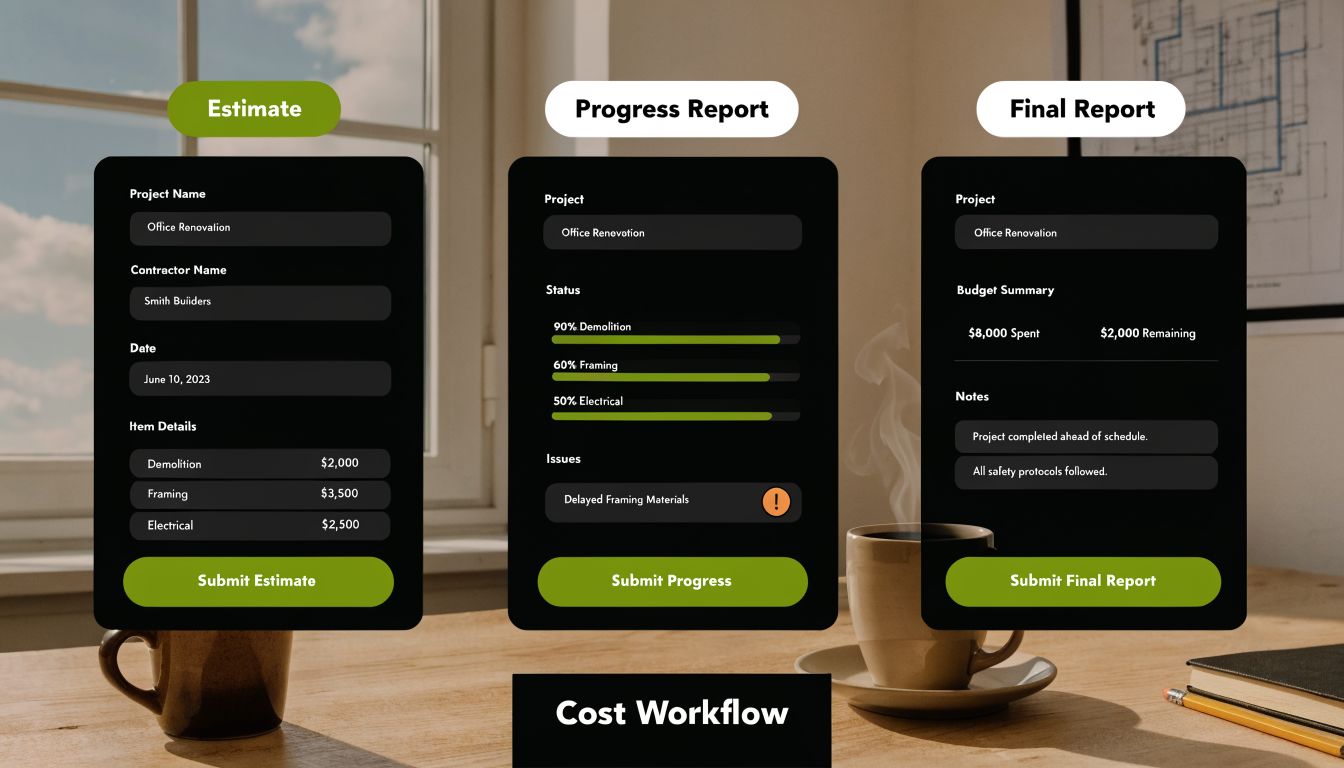
If your construction job cost accounting only happens after the job is done, it’s too late to protect profit. The workflow has to start before the first hammer swing and keep going until the last review meeting.
Start with the estimate and build a budget from it
Your estimate should use the same cost structure you’ll use later when actual costs arrive. If you bid a kitchen with separate lines for cabinets, install labor, electrical, plumbing, and tile, then those same buckets should appear in the live job.
That way, the estimate becomes the budget instead of a throwaway sales document.
A simple workflow looks like this:
Estimate the job by cost code
Break the project into clear parts instead of using giant lump sums.Set the job budget before work starts
Lock the expected cost structure in place so everyone measures against the same target.Assign every purchase and hour to the right code
Don’t let receipts and timecards float around uncategorized.
Track the job while it is alive
Many remodelers slip when the crew tracks time loosely, receipts sit in trucks, and change orders live in text threads. Then the office tries to rebuild the truth later.
That’s backwards.
According to Acumatica’s job cost accounting guide, firms that integrate real-time field data with office accounting software can detect cost overruns 30% faster. That kind of speed matters when you’re trying to protect residential remodel margins.
A practical field-to-office rhythm might look like this:
- Crew time daily through a mobile app by job and cost code
- Material receipts entered or matched to the right phase quickly
- Sub invoices reviewed against the scope they belong to
- Change requests documented before the extra work drifts into the base contract
- Weekly budget checks so the project manager isn’t flying blind
If the office sees bad numbers two weeks late, the job usually pays the price.
Close the loop after the job ends
When the project wraps, run a final job cost report and read it like a lesson, not a report card.
Ask things like:
- Where did labor drift?
- Which allowance categories stayed clean?
- Which selections caused friction?
- Did the final change orders cover the actual work?
This final review is where estimating gets smarter. You stop bidding from memory and start bidding from history. Over time, that’s how a remodeling company gets calmer. Not because jobs get easier, but because the numbers get clearer.
Key Reports and Numbers That Actually Matter
You don’t need a hundred reports. You need a few reports you’ll read.
For most remodelers, the most useful one is the budget versus actual job cost report. It’s the scorecard that compares what you planned to spend against what you really spent. When you read it right, it tells you where the job behaved and where it got weird.
How to read a budget versus actual report
Here’s a simple example of how a remodeler might look at one:
| Cost Category | Budget | Actual | What it tells you |
|---|---|---|---|
| Framing labor | Estimated amount for framing | Real amount spent on framing | Did the crew use more time than expected |
| Tile materials | Estimated tile and setting materials | Real tile-related purchases | Did selections or waste push this up |
| Plumbing subcontractor | Planned plumbing sub cost | Final plumbing invoice total | Did scope stay aligned with the original plan |
You don’t need accounting jargon to read that. You’re just comparing plan versus reality.
If actual is higher than budget, that gap is a variance. Variance isn’t bad by itself. It’s just a signal. The useful part is asking why.
The questions that make the report useful
A good owner doesn’t stare at the report and feel shame. A good owner gets curious.
Ask:
- Was this overrun caused by bad estimating or a real scope change
- Did we approve the change but fail to code it correctly
- Did labor run long because the plan was weak, the site was messy, or selections came late
- Which categories keep drifting job after job
That last question is gold. One weird job can be noise. A repeated pattern is a business issue.
The main numbers most remodelers should care about from this report are:
Gross profit by job
This tells you whether the project carried its weight.Labor cost variance
This shows whether field production matched the estimate.Material variance
This helps you spot allowance misses, waste, or purchasing drift.
If you want a practical companion to this conversation, this explanation of general contractor markup helps clarify the difference between markup thinking and actual job performance. That difference trips up a lot of owners.
A healthy report doesn’t just answer “What happened?” It helps you ask “What should we change on the next bid?”
When a report leads to a better estimate template, tighter change-order habits, or cleaner labor tracking, it’s doing its job.
Common Mistakes and Recommended Software for Remodelers
Most job costing problems don’t come from a lack of effort. They come from a handful of repeat mistakes.
The good news is that the fixes are usually simple.
Three mistakes that quietly eat profit
Forgetting labor burden
You price wage only, but the true labor cost is higher. Fix it by loading labor with the full business cost before you build estimates.
Using one giant materials bucket
If every purchase gets dumped into “materials,” you can’t see whether cabinets, tile, or trim caused the pain. Fix it by splitting materials into meaningful categories tied to project phases or scopes.
Reviewing the numbers after the job is over
Post-job review matters, but it can’t be your first look. Fix it by checking job costs during the project so you can still correct course.
A fourth mistake shows up a lot in residential remodeling. Owners track the contract but not the living, breathing changes around it. Selections shift. Add-ons appear. Field decisions get made fast. If you don’t connect those events to cost codes and approvals, profit leaks out through tiny holes.
What software should do for you
The right software isn’t the one with the most buttons. It’s the one your team will use.
For many remodelers, that means combining accounting software with a construction project management platform. A common setup might include QuickBooks Online on the accounting side and a tool like Buildertrend or CoConstruct on the project side. The point isn’t the brand name by itself. The point is getting time, bills, receipts, and change information to flow cleanly from the field into the financial reports.
Look for tools that help with:
- Mobile time entry by job and cost code
- Purchase and invoice coding without double entry
- Change order tracking tied to the project budget
- Clear budget versus actual reporting
- Easy field and office sync
If you want another outside perspective on how software supports construction operations, Safety Space's construction management guide offers a useful overview of what teams should evaluate in a platform.
For companies trying to connect lead flow, project handoff, and customer communication, the CRM layer matters too. This guide to CRM software for builders is helpful if your sales and production systems still live in separate worlds.
Software doesn’t fix sloppy habits. But good software makes good habits easier. That’s usually the win remodelers need.
If you want help building a remodeling business that attracts better-fit leads and supports cleaner operations around them, Constructo Marketing is worth a look. They focus on remodelers chasing $75K–$300K residential projects and build systems around visibility, lead flow, follow-up, and long-term growth.