


You've probably got a folder full of beautiful project photos right now. Clean kitchens. Sharp tile work. Before-and-after transformations that should make a homeowner stop scrolling and call you.
But most of those photos aren't bringing in leads because Google doesn't understand them.
That's the core problem. Your photos may look impressive to a person, but if they're uploaded with weak file names, missing alt text, poor page placement, or buried in the wrong part of your site, they stay invisible. That's a missed opportunity for any remodeler trying to win local, high-value jobs.
Good Google Image SEO isn't about chasing vanity traffic. It's about helping the right homeowner find the right proof at the right moment. If someone searches for kitchen remodel ideas in your city, your work should have a chance to show up. If they're comparing contractors, your images should help close the gap between curiosity and inquiry.
Keep it simple. Treat every completed project like a marketing asset, not just a photo dump. If you're already investing in SEO for remodelers, image SEO should be part of the system, not an afterthought.
Table of Contents
- Why Your Project Photos Are Invisible on Google
- The Perfect Photo File Before You Upload
- Optimizing Images Directly on Your Website
- Advanced Plays for Winning Local Searches
- How to Know If Your Image SEO Is Working
- Your Simple Google Image SEO Workflow
Why Your Project Photos Are Invisible on Google
You're not losing because your work is bad. You're losing because Google can't “see” your work the way a homeowner can.
Think of it like this. A project photo without proper image SEO is like a great tool tossed into a giant warehouse with no label. The tool still works. It just never gets found when someone needs it.

Google Images is not side traffic
A lot of contractors treat image search like a nice bonus. That's the wrong mindset.
According to Supple Digital's SEO statistics, 32.9% of Google search queries return image results, and images account for approximately 3% of all Google search clicks. That means image search is part of the significant search domain, not some tiny corner of the internet.
For remodelers, that matters because your service is visual. Homeowners don't just want promises. They want proof.
Why contractors miss this channel
Most remodeling websites make the same mistakes:
- They upload phone photos as-is without renaming files or resizing them.
- They bury galleries on pages with no local context.
- They use weak labels like “IMG_4832.jpg” that tell Google nothing.
- They separate photos from service pages instead of placing kitchen photos on kitchen pages and bath photos on bath pages.
Your photos don't rank because Google isn't guessing. It needs clear labels and clear context.
A homeowner searching for “custom kitchen remodel Bethesda” isn't looking for abstract marketing copy. They want to see who does that kind of work, what it looks like, and whether it fits the level of finish they expect.
That's why Google Image SEO matters. It turns your gallery from a passive portfolio into a discovery tool.
What good image SEO actually does
Done right, image SEO helps Google connect three things:
| What Google needs | What you should give it |
|---|---|
| A clear subject | A descriptive file name and alt text |
| A clear topic | Relevant text around the image |
| A clear location and service fit | Photos placed on the right local service pages |
That's it. No mystery. No magic.
If your site shows a luxury primary bathroom remodel in Arlington, but the file name is generic, the alt text is blank, and the image sits on a random gallery page with no supporting copy, you've made Google do all the work. It won't.
The Perfect Photo File Before You Upload
Most image SEO wins happen before the image ever touches your website.
That's the part people skip. They think optimization starts inside WordPress or Squarespace. It doesn't. It starts with the actual file.
Don't use camera names
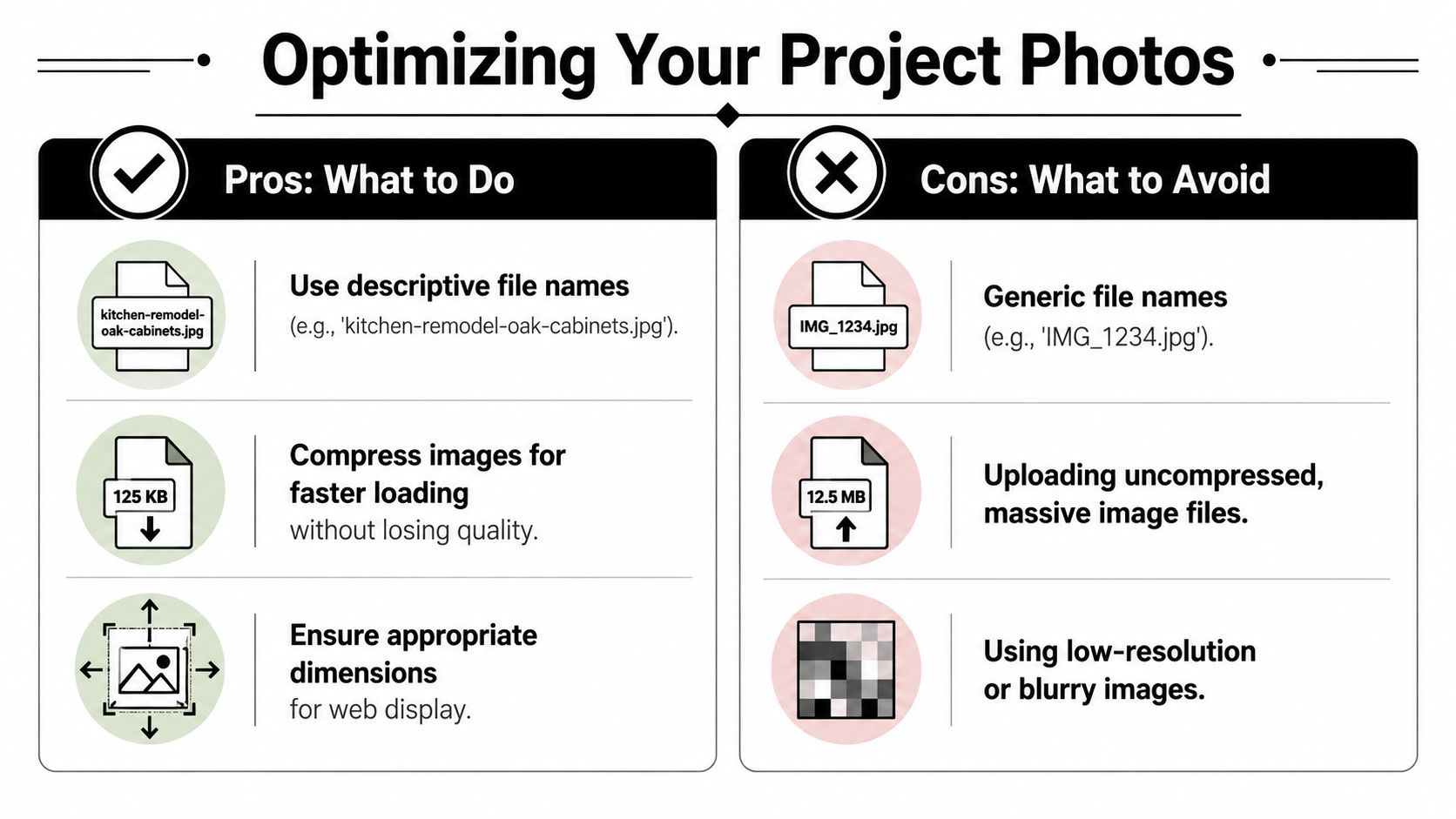
If your image file is called IMG_8021.jpg, that file tells Google nothing.
Use names that describe the project in plain English. Keep them short, specific, and readable.
Don't do this
IMG_8021.jpgkitchenfinalNEW2.pngbathroom-photo-best-remodel-chevy-chase-maryland-1-2-3.jpg
Do this instead
luxury-kitchen-remodel-bethesda-md.jpgprimary-bathroom-remodel-arlington-va.jpgcustom-built-in-cabinets-mclean-va.jpg
Google's own image guidance says Google can discover images through standard HTML <img> elements, CSS images are not indexed, and Google recommends descriptive filenames, titles, and alt text in its Search Central documentation.
Pick the right file type
You don't need to overcomplicate this.
Use this rule:
- JPEG for most project photos
- PNG for logos, graphics, or images that need transparency
- WebP if your website platform or image plugin supports it cleanly
- SVG for simple icons or vector graphics
If you're a contractor, most of your portfolio photos are standard photography. That means JPEG or WebP will handle the job.
Resize before upload
Uploading giant images slows down your site. Slow pages frustrate homeowners and create technical drag.
Imagine trying to shove a huge poster through a mail slot. It can fit eventually, but it's clumsy and wasteful.
A simple pre-upload checklist
Before any photo goes live, check these five things:
Choose the best version
Don't upload ten near-identical photos. Pick the sharpest, clearest angle.Rename the file
Use service + project type + city when it makes sense.Resize it for web use
Keep enough quality to look polished, but don't upload oversized originals from your phone or camera.Use the right format
Photos usually belong in JPEG or WebP. Don't use PNG for everything.Keep the subject obvious
Blurry, dark, cluttered photos are weak SEO assets because they're weak marketing assets.
Practical rule: If the image wouldn't help a homeowner trust you, it won't help your SEO much either.
One technical mistake that gets ignored
Some sites use background images in sliders or design blocks instead of normal image elements. That looks fine to a visitor, but it can hurt discoverability because Google indexes standard <img> elements, not CSS images.
So if your web designer builds half your portfolio with background-image styling, fix that. Your best work should live in real, crawlable image elements on real pages.
Optimizing Images Directly on Your Website
Once the file is ready, the next job is giving Google the context it needs on the page itself.
Many contractors either do too little or do something sloppy like stuffing city names everywhere. Don't do that. Clear beats clever.
Alt text is a simple description
Alt text is just a short description of the image.
The easiest way to think about it is this. Alt text is like whispering in Google's ear what the photo shows. If your alt text is useful, Google has a better shot at understanding the image. If your alt text is blank, generic, or stuffed with junk, you waste the opportunity.
Good alt text for remodeling photos
Write alt text like you're describing the photo to someone who can't see it.
Bad alt text:
- kitchen remodel
- contractor bathroom renovation
- home remodeler kitchen remodel kitchen remodel
Better alt text:
- Modern kitchen remodel in Bethesda with white oak cabinets and waterfall island
- Primary bathroom remodel in Arlington with walk-in glass shower and double vanity
- Custom mudroom built-ins in McLean with bench seating and wall hooks
Keep it natural. Describe what's visible.
Don't write alt text for a robot. Write it so a real person would understand the image in one sentence.
Put images next to matching content
If you want a kitchen photo to rank for kitchen-related searches, it should sit on a kitchen remodeling page or a kitchen project page. Same with bathrooms, additions, basements, and outdoor living.
That's basic context.
A lot of contractor sites make this harder than it needs to be. They dump all photos into one giant gallery and hope Google sorts it out. Instead, place your strongest project images near the text that explains the service, the process, the location, and the result. That connection matters.
If you're building out stronger supporting pages, this guide on types of content for content marketing can help you think beyond a single gallery page.
Captions and titles still help
You don't need captions under every image. That gets messy fast. But for hero images, before-and-after shots, and signature projects, captions can help users and reinforce context.
A simple caption works well:
- “Whole-home remodel in Chevy Chase featuring custom kitchen and new stair railing”
- “Before and after basement remodel in Alexandria”
Image titles can also be useful inside your media library, but don't obsess over them. File name, alt text, and page placement matter more in practice.
Keep this clean inside your CMS
Whether you use WordPress, Squarespace, or GoHighLevel, your process should be the same:
| Field | What to write |
|---|---|
| File name | What the image is, in plain English |
| Alt text | A natural visual description |
| Caption | Optional, only when helpful to the visitor |
| Placement | On the most relevant service or project page |
If your office manager uploads photos, give them a template. Don't leave this to memory.
Advanced Plays for Winning Local Searches
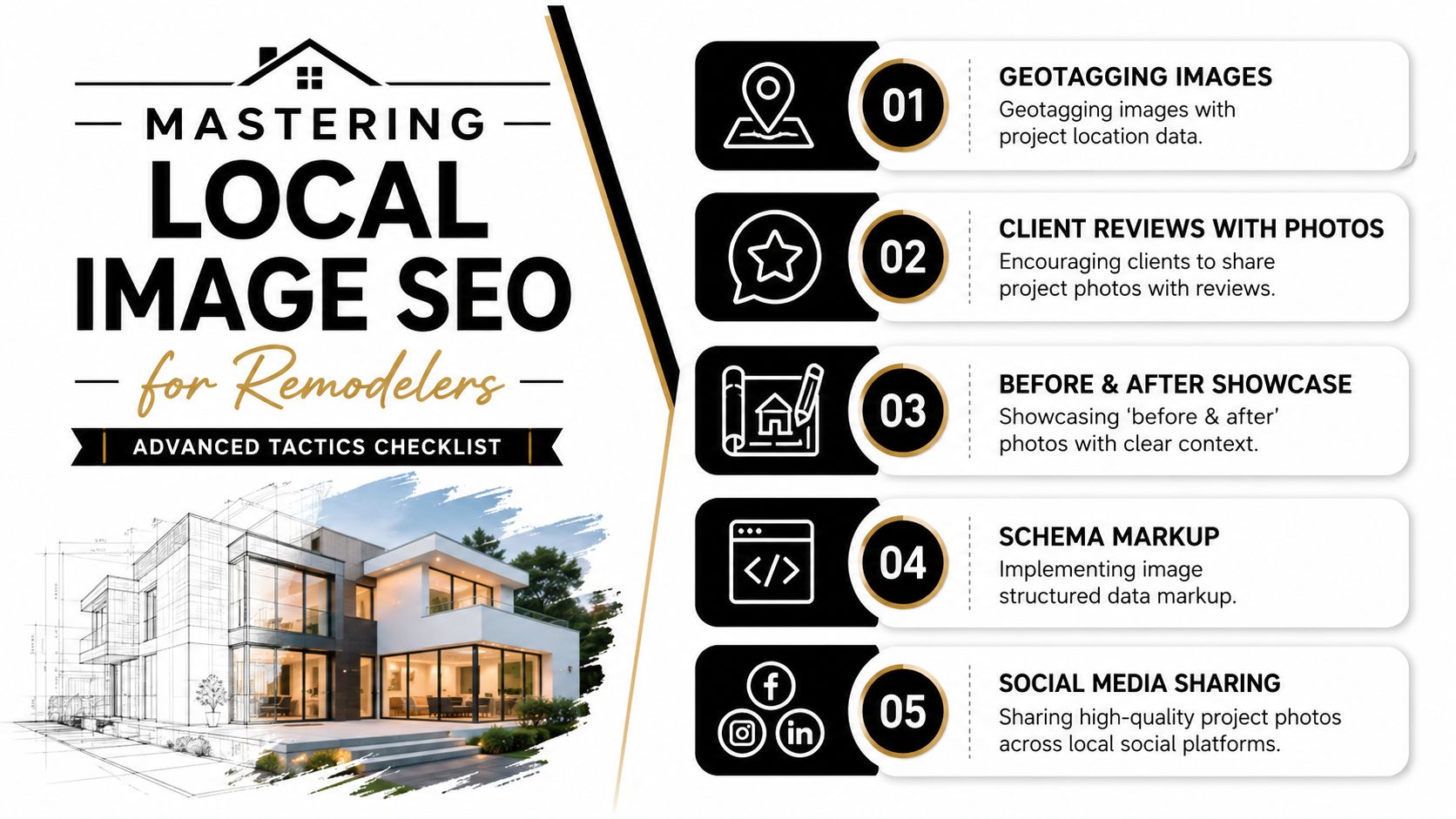
Basic image SEO gets your photos understood. Local image SEO gets your photos working harder in the markets where you want jobs.
That means thinking beyond your website gallery. Your image system should support Google Images, local trust signals, and lead generation without turning your site into a slow mess. That's the core issue raised in Digital Applied's visual search guide, especially for contractors who need to balance visual proof, speed, and conversions.
Treat Google Business Profile like a second gallery
Your Google Business Profile matters because many homeowners will see your photos there before they ever reach your website.
A weak profile usually has random uploads, old team shots, and a handful of low-quality jobsite images. A strong one shows real work, real people, and real consistency.
Upload photos that prove you're active and credible:
- Completed projects with clean, well-lit final shots
- Before-and-after sets with obvious transformation
- In-progress photos that show craftsmanship, not chaos
- Team photos so the business feels real
- Exterior branding shots of trucks, signs, or crews at work
If you want ideas for keeping your profile active and useful, some of the posting and visibility habits in VIP TECH CONSULTING's GMB strategies are worth adapting to a contractor context, even though the example industry is different.
For a contractor-specific approach, this walkthrough on Google Business Profile for contractors is the more direct next step.
Ask your developer about these technical items
You don't need to code this yourself. But you do need to know what to ask for.
Image sitemap
An image sitemap is just a map for Google. It helps Google find your project images faster and more reliably.
If your site has lots of gallery pages, service pages, or a portfolio with many project images, ask your developer whether image URLs are included in your sitemap and submitted through Google Search Console.
Responsive image delivery
Your site should serve images in a way that fits the device. A phone doesn't need the same image size as a desktop monitor.
Ask if your website uses srcset or <picture>, and whether supported formats like JPEG, PNG, WebP, or SVG are being delivered cleanly. If your developer looks confused, that's a problem.
Stable image URLs
If the same image appears on multiple pages, keep the same image URL instead of creating duplicates or changing paths for no reason. Google's guidance on image handling supports this because it helps caching and avoids unnecessary repeat fetching, which is better for crawl efficiency.
Ask your web team: “Are our project images on stable URLs, in the sitemap, and delivered responsively?”
One more local advantage
Homeowners trust authentic job photos more than polished stock-looking images.
So skip fake perfection. Use sharp real photos from real local projects. Show the cabinetry details. Show the tile pattern. Show the mudroom storage. Show the outdoor kitchen at dusk. Those are the visuals that help you win better-fit leads.
If you want a done-for-you system for local visibility, website structure, and Google Business Profile support, Constructo Marketing is one option that works specifically with remodelers and contractors.
How to Know If Your Image SEO Is Working
Most contractors don't need another dashboard. You need a fast way to tell whether this work is producing visibility.
Use two simple checks.
Check Google Search Console
Open Google Search Console and go to the Performance report. Look for image-related search visibility and clicks tied to the pages and project types you care about.
You're not trying to become an analyst. You're looking for signs that Google is surfacing your images and that searchers are clicking them.
Look for things like:
- Queries related to your services and locations
- Pages that include project galleries or service photos
- Image impressions and clicks increasing over time
If your kitchen page starts picking up image visibility for local remodel searches, that's a strong sign your image setup is getting traction.
Run a plain Google Images search
This one is low-tech and useful.
Search the way a homeowner would search:
- kitchen remodel bethesda md
- bathroom remodel arlington va
- home addition contractor mclean va
Then go to Google Images and see what shows up. Are your photos there? Are competitors dominating? Are unrelated Pinterest images crowding you out?
That quick check tells you whether your images are becoming visible in the public search results, not just inside a reporting tool.
If you never search your own market in Google Images, you're flying blind.
Watch for business signals too
Rankings matter less than outcomes.
If image optimization is doing its job, you should start seeing better alignment between your visual content and the leads coming in. Homeowners may mention a project they saw. They may reference a kitchen style from your gallery. They may come in warmer because the proof was already there.
That's the point. Better image SEO should support better-quality conversations.
Your Simple Google Image SEO Workflow
The biggest mistake is treating Google Image SEO like a one-time cleanup project.
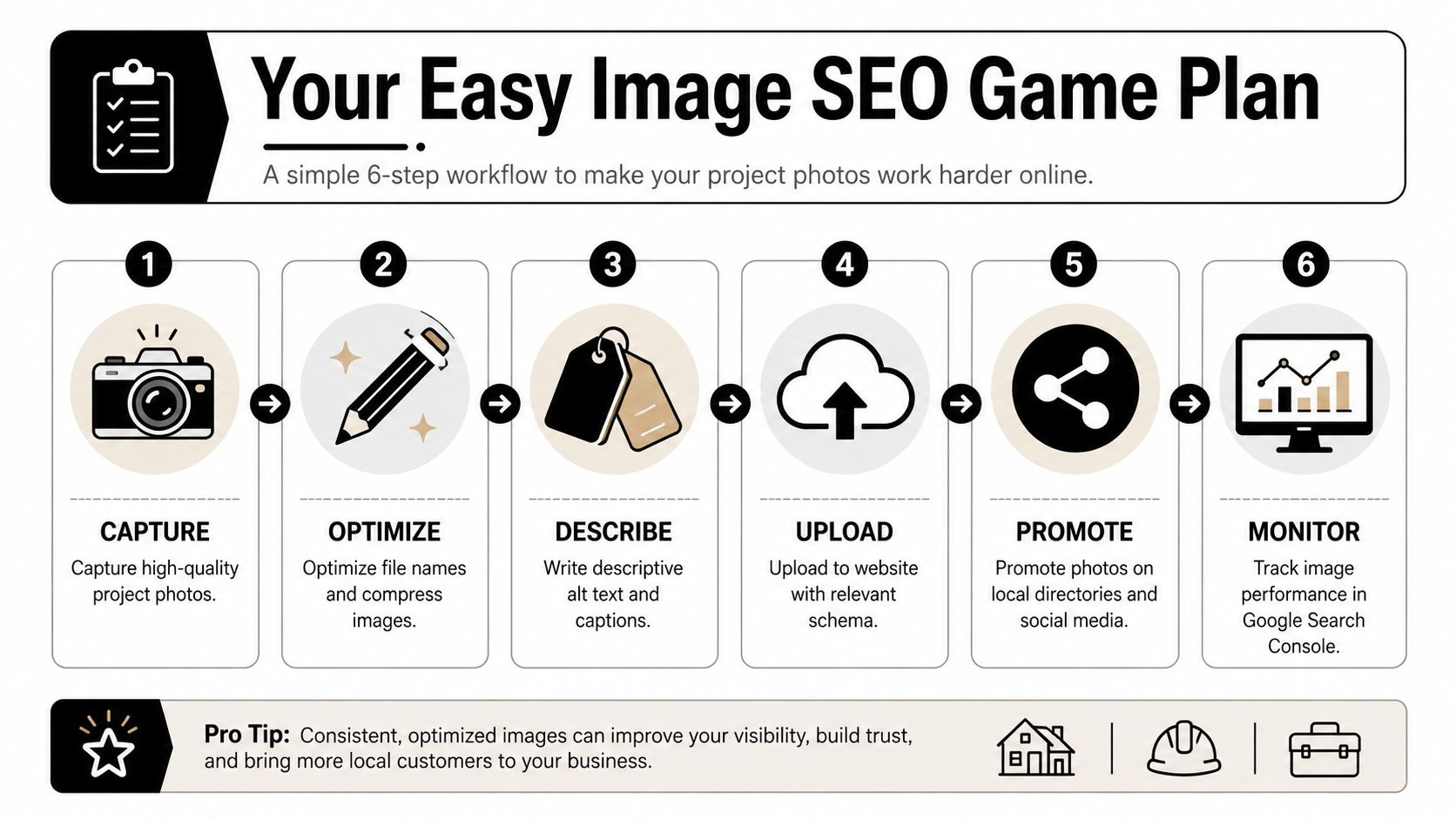
It works better as a habit. Every completed project should move through the same simple system. If your team can follow a closeout checklist, they can follow this too.
The repeatable checklist
A strong image SEO system usually comes down to five core controls: original or useful imagery, descriptive filenames, useful alt text, responsive delivery, and image sitemaps, as outlined in SE Ranking's image SEO guide.
Here's the contractor version:
Pick the best photos
Choose the clearest finished shots plus a few before-and-after images if they tell the story well.Rename every file before upload
Use real words. Service, feature, and city are usually enough.Resize and compress
Keep quality high, but make the files web-friendly.Upload to the right page
Kitchen photos go on kitchen pages. Bathroom photos go on bathroom pages. Don't dump everything into one gallery and call it done.Write alt text
Describe what the image shows in plain English.Add key photos to Google Business Profile
Your site and your profile should work together.Check Search Console once a month
Five minutes is enough.
Keep it boring and consistent
That's the real win. Boring, consistent execution.
If you want another contractor-focused perspective on building search visibility over time, this practical guide to contractor SEO is worth skimming.
You don't need perfect image SEO. You need a repeatable process that turns finished projects into searchable proof. Do that every month, and your photo library stops being decoration. It starts helping you win better jobs.
If you want help turning your project photos, website, Google Business Profile, and local SEO into one lead generation system, talk to Constructo Marketing. They work with remodelers who want more visibility for the kind of projects they want to build.