


Your phone rings while you're trying to answer a cabinet question from the field. A web lead came in last night. Someone wrote a name on a sticky note. A salesperson says a proposal is “pretty much sold,” but production has no clue when that job will start. Meanwhile, you're looking at next month and still can't say with confidence what's really booked, what's just talk, and what's about to fall apart.
That's normal in a lot of remodeling companies. It's also expensive.
Most dropped leads and messy projects don't come from bad intentions. They come from running the business out of inboxes, memory, and scattered notes. Project pipeline management fixes that by giving every opportunity and every job a clear place, a clear stage, and a clear next step. Consider the analogy of framing a house. If the layout is crooked at the start, every trade fights the structure later.
Table of Contents
- Tired of Chaos? Let's Build Your Project Pipeline
- Drawing the Blueprint of Your Remodeling Pipeline
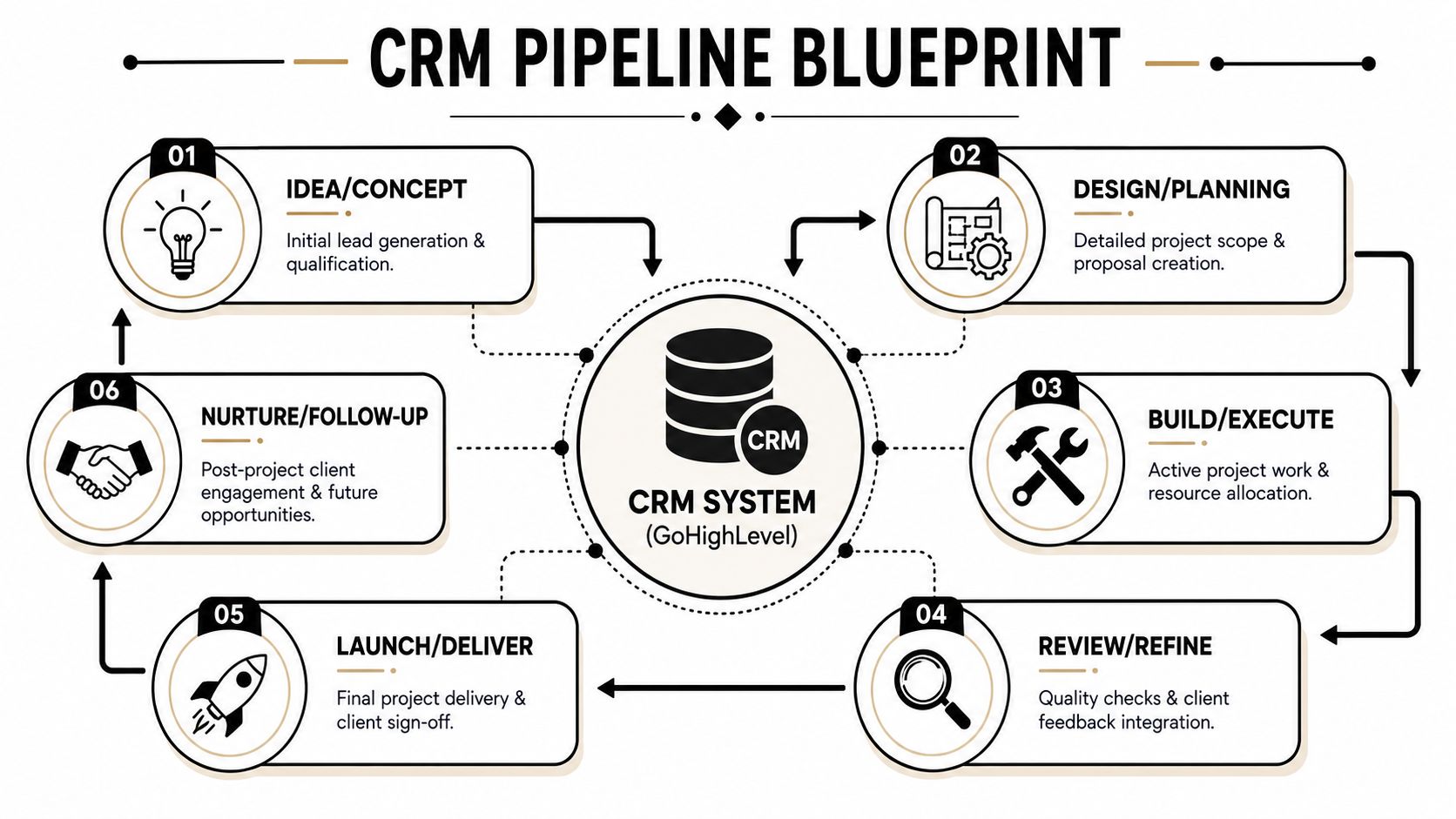
- Building Your Pipeline in a CRM Like GoHighLevel
- Automating Your Workflow to Prevent Costly Leaks
- The Critical Handoff from Sales to Production
- Your Dashboard for Measuring Pipeline Health
Tired of Chaos? Let's Build Your Project Pipeline
A lot of remodelers are running two businesses at once. One is the formal company. The other is the invisible one living in text threads, call logs, desk notes, and someone's head.

It usually looks like this. A homeowner calls about a kitchen remodel. You mean to call back after lunch. Then a supplier issue pops up, a crew question comes in, and the callback gets pushed. Later, the lead goes cold, not because they weren't a fit, but because no one owned the next step.
That same chaos shows up on the production side. One project is waiting on selections. Another is “approved” but not really ready. A third got sold with notes buried in an email chain. Everybody stays busy, but the business still feels slippery.
What a pipeline really is
A project pipeline is just an organized path from first contact to final closeout. It shows where each opportunity sits, what must happen next, and who owns it. That's it.
Practical rule: If a job doesn't have a stage, an owner, and a next action, it's not being managed. It's being hoped for.
Disciplined project management practices are tied to real business outcomes. Organizations that implement those practices report a 92% success rate in meeting strategic goals, according to ITONICS best-practice guidance on project pipeline management. For a remodeler, that means turning goals from wishful thinking into something you can drive toward.
Why remodelers need a simple system
You don't need a corporate PMO. You need a board your team can understand in seconds.
The easiest way to think about project pipeline management is as an assembly line for jobs. Leads come in. Good ones move forward. Weak ones stop early. Approved jobs get planned. Ready jobs move to production. Finished jobs close cleanly.
If your marketing and sales feel messy before projects even start, a simple process map helps there too. This guide on Sensoriium on marketing structure does a good job showing how mapping a process exposes hidden breakdowns.
A solid pipeline doesn't remove work. It removes confusion. That's why owners who install one usually feel the same first change. Less chasing. More clarity.
Drawing the Blueprint of Your Remodeling Pipeline
You wouldn't pour concrete without a layout. Your pipeline needs the same kind of structure.
The strongest model is a gated flow. Work moves from one stage to the next only when the required information is complete. In broader project management, that flow is commonly defined as ideation → work intake → portfolio review and prioritization → detailed planning → execution → monitoring → closure, and the most important gate is the initial intake because that's where weak projects get filtered before they consume resources, as described in Optimiser's guidance on project pipeline management.
Think in stages, not in guesses
Many remodeling companies use vague labels like “hot lead,” “working on it,” or “almost ready.” Those labels sound familiar, but they don't tell your team what to do.
A better pipeline uses plain stages tied to real actions. Each stage answers one question: What must be true for this job to move forward?
Here's a simple house-building analogy:
- Lead came in is like unloading materials at the site.
- Qualified is checking whether the lot is buildable.
- Proposal sent is your plan set.
- Signed and approved is permit in hand.
- Production ready is having trades, materials, and schedule lined up.
- In production is active construction.
- Closed is final walkthrough and punch complete.
A stage should describe a fact, not a feeling.
That one shift changes a lot. Your team stops arguing about whether something is “close.” They start checking whether the actual requirements are done.
Example remodeler project pipeline stages
Use this as a starting point. Adjust the names if needed, but keep the logic tight.
| Stage Name | What It Means | Action to Move Forward |
|---|---|---|
| New Inquiry | A lead has contacted your company | Enter contact details, source, project type, and assign owner |
| Qualified Lead | You've confirmed budget fit, project type, service area, and timeline fit | Complete discovery call or initial screening |
| Site Visit Scheduled | The lead is qualified and booked for an in-person or virtual consultation | Confirm date, time, decision-makers, and pre-visit notes |
| Scope Defined | You understand the project well enough to price or design it | Collect measurements, goals, selections status, and scope notes |
| Proposal Sent | Client has received pricing or design-build proposal | Set follow-up date and log objections or open questions |
| Signed Client | Contract or agreement is accepted | Collect signed documents and payment details |
| Production Ready | Job has everything needed for a clean handoff | Finalize selections, schedule assumptions, internal notes, and responsible parties |
| In Production | Work is active and being tracked | Monitor progress, issues, client communication, and change management |
| Closed | Work is complete and administratively finished | Final invoice, closeout notes, warranty info, and review request |
Why the gate matters most at the front
The first gate matters more than most owners think. If weak jobs enter the system, they clog everything behind them. Sales chases people who were never serious. Design spends time on homeowners who aren't ready. Production forecasts start to lie because the pipeline is full of noise.
That's why good project pipeline management starts with saying no earlier.
A small, clean pipeline beats a bloated one every time. It's easier to forecast, easier to staff, and much easier to trust.
Building Your Pipeline in a CRM Like GoHighLevel
A whiteboard helps until someone is in the field, working remote, or forgetting to update it. Your pipeline needs to live in one place where sales, admin, and production can all see the same truth.
For many remodelers, that place is a CRM like GoHighLevel.
Set up the board your team will actually use
Inside GoHighLevel, build an opportunity pipeline that matches the stages you defined. Each stage becomes a column. Each lead or job becomes a card.
That visual board matters because people use what they can understand quickly. A production manager should be able to open the CRM and see what's waiting, what's stuck, and what's moving without digging through notes.
Start simple:
Create one pipeline for sales and preconstruction
Don't build a giant maze of statuses on day one. Begin with the core stages from inquiry through production-ready.Name stages in plain language
“Qualified Lead” works. “Pre-opportunity validation phase” does not.Assign one owner per card
Shared ownership usually means no ownership. One person can ask others for help, but one person must own the next move.Require a next step field
Every card should show the next action and due date. If there's no next action, the card is parked.
If you're comparing systems built for contractors, this roundup of CRM software for builders is a useful reference point for how different platforms support pipeline visibility.
Use the first column as a filter
One common failure in project pipeline management is overloading the pipeline with low-value projects. Guidance on pipeline flow points out that a healthier pipeline is often smaller and better qualified, and that the CRM's first stage should act as a strong front-end filter so the team doesn't get buried by “maybe” projects, as explained in the University of Wisconsin discussion of pipeline overload and front-end filtering.
That first column should not be a parking lot. It should be a checkpoint.
Try a simple intake scorecard before a lead moves forward:
Project fit
Is this the kind of work you want to build?Location fit
Is the home in your service area?Budget fit
Is there enough budget for the scope they want?Timeline fit
Are they ready on a realistic timeline, or just browsing?Decision-maker fit
Are the key decision-makers involved early?
If the answer is no on several of those, don't keep dressing the lead up as an opportunity. Close it out, nurture it, or refer it elsewhere.
Bad pipelines feel full. Good pipelines feel clear.
What each card should contain
A card in GoHighLevel should hold the details your team needs without forcing them to hunt.
At minimum, include:
- Client basics with name, phone, email, address, and preferred contact method
- Project summary with room type, goals, rough scope, and photos if available
- Budget and timing notes from the first call
- Lead source so you know where the opportunity came from
- Internal notes that stay clean and readable
- Tasks and appointments tied to the card
- Files such as proposal, signed paperwork, or selection notes as the job advances
Many teams overcomplicate this part. They create too many custom fields before the process is stable. Start with the few things your team uses every day. Add more only when a missing piece causes real friction.
The primary power of the CRM isn't that it stores data. It's that it gives the entire company one shared version of reality.
Automating Your Workflow to Prevent Costly Leaks
The fastest way to lose a good lead is silence. Not because your team doesn't care. Because people get interrupted.
Automation fixes the gaps between intention and action. It acts like a safety net under the routine tasks that tend to get missed when the office gets noisy.
Here's a simple example. A homeowner fills out your website form at night. Without automation, that lead sits until someone remembers to check in the morning. With automation, the system immediately sends a confirmation text, notifies the assigned salesperson, and creates a follow-up task. The lead feels acknowledged before your day even starts.
Three automations worth setting up first
The first automations should protect response time and follow-through. Don't start with fancy branching logic. Start with leaks.
New lead acknowledgment
If a web form is submitted, send an immediate confirmation text or email, assign the lead, and create a task for first contact. This doesn't replace the call. It buys time and reassures the homeowner that their inquiry didn't disappear.Proposal follow-up reminder
If a card sits in “Proposal Sent” without movement, trigger a task for the salesperson to follow up. That keeps good opportunities from dying in the quiet middle.Missed-call rescue
If someone calls and the team misses it, trigger a text-back that says you received the call and will return it. This one catches leads that otherwise vanish fast.
If you want to tighten this with smarter qualification logic, predictive lead scoring for contractors is worth reviewing. It helps frame which inquiries deserve faster attention and which need nurturing instead of immediate sales effort.
What automation should not do
Automation should handle repetition. It should not fake a relationship.
Don't use it to dump long robotic sequences on every homeowner. Don't trigger messages that sound like software wrote them. And don't automate past the point where your team stops thinking.
A good rule is simple:
Use automation to start conversations, assign work, and prevent delays. Use people to build trust, ask better questions, and close jobs.
Another mistake is building too many automations at once. When that happens, no one remembers what's firing, why tasks are being created, or where the process broke.
Keep it tight at first. Write down the trigger, the action, and the owner. Test one workflow. Make sure it works. Then add the next.
In remodeling, the boring things cause a lot of expensive damage. Missed follow-up. No reminder. No task. No confirmation. Automation handles those boring things consistently, which frees your team to do the human work better.
The Critical Handoff from Sales to Production
Most remodeling pain doesn't start with the hammer. It starts with the handoff.
Sales wins the job. Everyone celebrates. Then production gets a half-complete file, scattered notes, a verbal promise nobody documented, and selections that are “basically done.” That's when margin starts leaking.
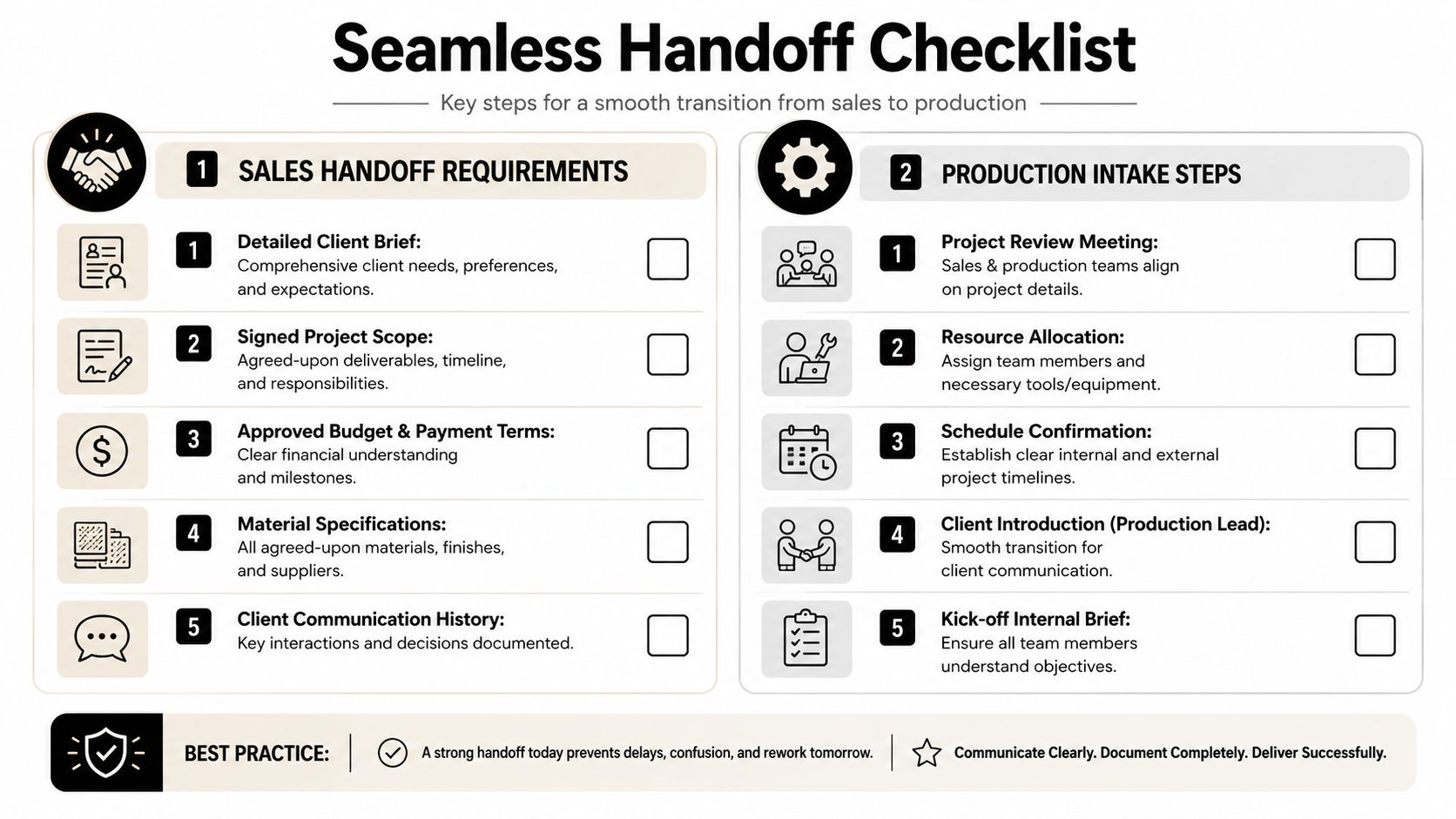
Treat the handoff like a permit set
A signed contract does not mean a project is ready for production. It means the job is sold.
Production readiness is a separate condition. The CRM card should only move into the production stage when the required information is complete, current, and easy to verify. This is similar to an architect providing plans to a foreman. If key details are missing, the field team pays for it later.
A connected workflow holds significant importance. Teams using tools that link lead data, job information, and operational updates tend to create cleaner handoffs than teams relying on email chains and verbal updates. For contractors exploring tighter operational connections, JobTread Connect for contractors is relevant because it speaks directly to reducing those system gaps.
Your non-negotiable handoff checklist
Before a project card moves from sales to production, confirm every item below. If one is missing, the card stays put.
Signed agreement is attached
Production shouldn't be guessing what was sold. The exact signed scope must be in the record.Client contact details are complete
That includes primary contact, spouse or co-decision-maker if relevant, address, phone, email, and preferred communication method.Scope notes are clear
Not shorthand. Not vague comments. Clear descriptions of rooms, work included, exclusions, and any known constraints.Selections status is documented
If materials are finalized, log them. If they are not, mark what's pending and who owns it.Budget and payment terms are visible
The team needs to know approved amounts, allowances if used, and payment expectations.Promises made during sales are recorded
If the salesperson told the client something important, it belongs in the file. Hidden promises become field problems.Site conditions and risk notes are added
Parking issues, access limits, pets, HOA restrictions, lead times, or homeowner schedule concerns should not live only in someone's memory.Internal kickoff is scheduled
Sales and production should review the project together before the first field move.
The cleanest projects usually start with the cleanest handoffs.
This one discipline changes client experience fast. Homeowners feel it when production already knows the story, understands the scope, and doesn't ask the same questions again.
Your Dashboard for Measuring Pipeline Health
A pipeline without measurement is just a prettier mess.
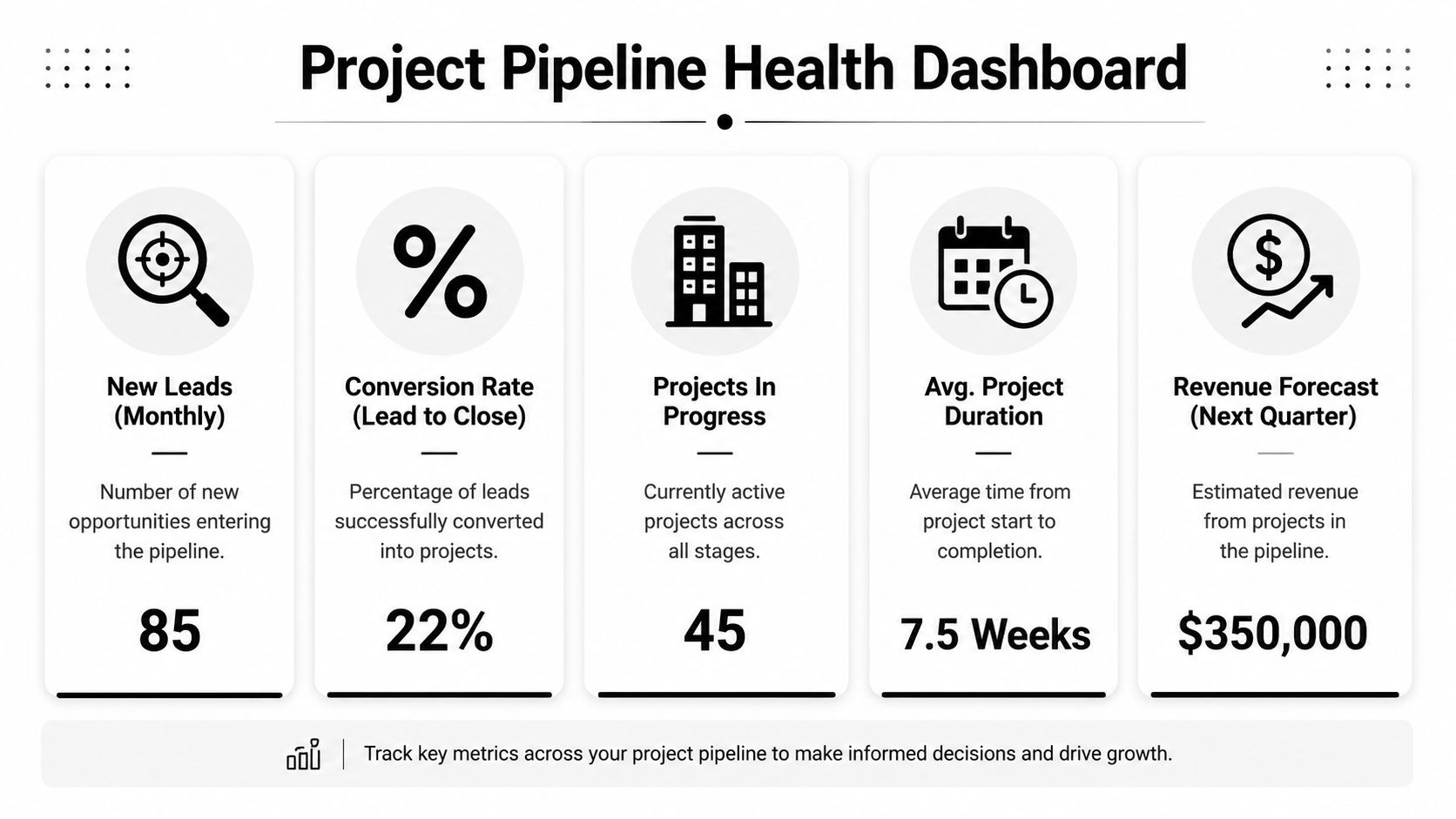
Owners don't need a giant analytics center. They need a small dashboard that works like the gauges on a truck. It should tell you whether the engine is running right, whether you're headed toward a bottleneck, and whether the work in front of you is likely to turn into revenue.
The gauges that matter most
Start with a few measures your team can understand and act on.
Pipeline value
The total value of open opportunities. This gives you a forward view, but only if the pipeline is clean.Close rate
How many proposals become signed jobs. This tells you whether your sales process and qualification are working together.Stage duration
How long leads or jobs sit in each stage. Long delays often point to bottlenecks, indecision, missing information, or weak follow-up.Projects in production
A simple count helps you compare what's active against team capacity.
What the numbers are trying to tell you
Project delivery is hard across industries. Some industry summaries show that only around 35% of projects are completed on time and on budget, and that's why KPI tracking matters. Monitoring pipeline health helps owners spot poor estimation, scope creep, and resource bottlenecks before a job fully derails, according to Ravetree's summary of project management statistics.
You don't need to obsess over every metric every day. You do need a weekly habit.
If stage duration is growing in estimating, your proposals may be too slow or too complicated. If close rate is weak, qualification may be loose. If pipeline value looks healthy but production-ready jobs are thin, your forecast is fluff, not scheduleable work.
A healthy dashboard doesn't just show activity. It shows where your process is lying to you.
When owners review those few numbers consistently, they stop managing by surprise. They start seeing trouble while it's still small.
If your remodeling company needs cleaner lead flow, tighter CRM stages, and follow-up systems that don't let opportunities slip through, Constructo Marketing helps remodelers build that structure around real-world sales and operations. Their focus on remodelers, GoHighLevel workflows, and visibility into pipeline KPIs makes them a strong fit for owners who want more control and less chaos.