Published May 23, 2026
Your phone rings during a site walk. A form fill hits your inbox. Two more leads land in GoHighLevel before lunch. One homeowner wants a full kitchen and main-floor rework. Another wants a faucet swap. A third lives outside your service area but still wants an estimate “just to compare.”
This is the core issue for a serious remodeler. It usually isn't lead volume by itself. It's mixed lead quality. You're spending the same attention on bad-fit inquiries that your best prospects deserve.
If you chase every lead the same way, your sales process turns into triage. You call the loudest person first, not the best opportunity first. That costs time, focus, and jobs.
Table of Contents
- Tired of Chasing Every Single Lead
- What Is Predictive Lead Scoring Explained Simply
- Why This Is a Game-Changer for High-Value Remodelers
- The Data Your Scoring System Needs to Learn
- A Remodeler's Playbook for Implementation
- Sample Scoring Features and Key Metrics to Track
- Common Pitfalls and How to Stay on Track
Tired of Chasing Every Single Lead
You already know the pattern. A lead comes in from Google Ads. Another comes from your Google Business Profile. Someone fills out the contact form after reading three pages on your site. Someone else leaves a voicemail asking if you can “ballpark” a tiny repair.
By the end of the day, your pipeline looks busy, but busy doesn't mean good.
For a remodeler, that's dangerous. The best projects need quick follow-up, smart qualification, and a salesperson who isn't burned out from calling junk leads first. If your team treats every inquiry like it has the same value, your best opportunities get buried under noise.
What this looks like in real life
A design-build owner checks GoHighLevel at night and sees a stack of fresh leads. He starts calling in order. First call is a bad zip code. Second is a budget mismatch. Third wants a timeline that makes no sense. By the time he gets to the homeowner who actually wants a serious addition, that person has already talked to another contractor.
That's why more leads alone won't fix the problem. Better sorting will.
Plain truth: You don't need to talk to fewer homeowners. You need to know which homeowners deserve your fastest response.
A lot of remodelers spend money on traffic before they've fixed qualification. That's backwards. If you want stronger lead flow, your marketing and sales system has to work together. A good starting point is understanding how lead generation for contractors should connect to screening, follow-up, and job fit.
The real bottleneck
The bottleneck isn't your website. It isn't Google Ads by itself. It isn't even your office staff.
The bottleneck is lack of insight at the moment a lead arrives. You need a fast way to separate likely projects from distractions. That's where predictive lead scoring earns its keep. It serves as a digital foreman for your sales process. It helps you decide what to do first, before time slips away.
What Is Predictive Lead Scoring Explained Simply
Predictive lead scoring is a smart way to sort leads based on how likely they are to become customers.
Consider a fishing sonar. A cheap sonar just tells you something is in the water. A smart sonar helps tell you what kind of fish is down there and whether it's worth chasing. That's what predictive lead scoring does with leads. It doesn't just say, “A person visited your site.” It looks for patterns that match people who became real customers before.
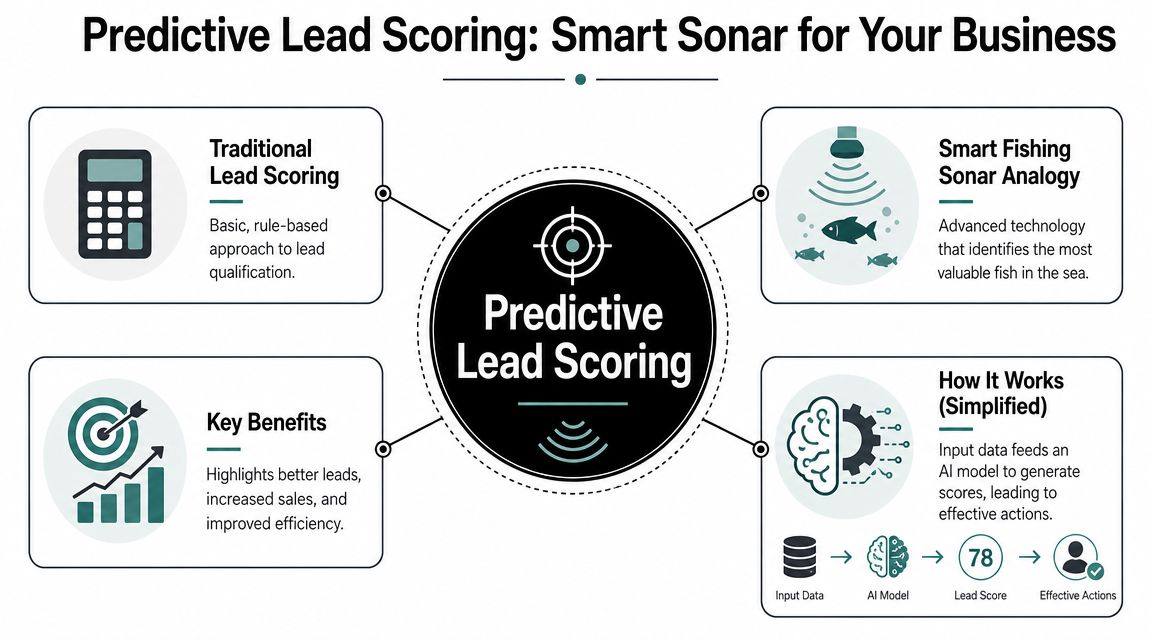
Old scoring guesses and predictive scoring learns
Old-school lead scoring is usually manual. Someone says:
- give points for opening an email
- give more points for filling out a form
- subtract points for something that looks weak
That system can work for a while, but it's still mostly a human guess.
Predictive lead scoring is different. Academic research now treats it as the likely successor to older rule-based scoring because it uses data-driven methods to find hidden patterns and estimate a propensity score for each lead. The same review notes that classification is the most common approach, with algorithms such as decision trees and logistic regression often used in practice, as explained in the 2023 review of lead scoring models and sales performance.
What the score is really doing
Here's the first-grader version. You show the system two piles:
- leads that became customers
- leads that didn't
Then the system studies both piles and asks, “What do the good ones have in common?”
Maybe your better prospects looked at kitchen galleries, visited financing information, responded fast, and came from the right towns. Maybe weak leads bounced around blog posts, visited the careers page, or asked for work you don't even want.
It's not magic. It's pattern matching based on your own history.
That matters because remodelers don't need another dashboard. They need help making better call-back decisions. Predictive lead scoring helps answer one simple question fast: Which lead should my team jump on first?
If that score is built well, it doesn't replace judgment. It sharpens judgment.
Why This Is a Game-Changer for High-Value Remodelers
Predictive lead scoring matters more for remodelers than for a lot of other businesses. You're not selling socks. You're chasing complex, high-trust projects with long sales cycles, multiple decision-makers, and homeowners who often contact more than one company.
When every serious opportunity can affect your schedule, crew planning, and revenue mix, lead quality becomes a sales priority, not just a marketing metric.
The cost of treating every lead equally
If you run a remodeling company, your calendar is already full. Estimates, selections, client meetings, change orders, jobsite issues. You can't afford to give premium response time to low-fit leads.
Predictive scoring helps in three practical ways:
- It protects owner time. You spend less energy on people who were never a fit.
- It improves speed-to-lead for better opportunities. The hottest lead gets the fastest call.
- It gives your team a shared rule. Instead of arguing about who to contact first, you follow the score and the context behind it.
That last point matters more than people admit. Plenty of leads look “interested.” Fewer look profitable, local, and aligned with the work you want.
A simple side-by-side example
Two leads hit your system within minutes.
Lead A comes from Google Ads. The homeowner visits your kitchen remodeling page, your portfolio, and your financing page. They fill out a detailed form and ask about a design consultation.
Lead B calls from your website and asks if you'll handle a small repair next week.
Both are leads. Only one deserves immediate white-glove follow-up.
Practical rule: The bigger the project value, the more dangerous it is to rely on gut feel alone.
This is why predictive lead scoring fits high-ticket local service businesses. It helps you stop thinking in terms of “more leads” and start thinking in terms of better ranked opportunities. For remodelers, that's the difference between a noisy pipeline and a workable one.
The Data Your Scoring System Needs to Learn
A scoring system is only as good as the ingredients you feed it. If you want useful predictions, you need the right inputs. The good news is you probably already have a lot of them.
The best predictive models learn from full-funnel historical outcomes, not just shallow activity. That means the model should look at what happened across your pipeline, not just whether someone clicked around your site. It should learn from CRM labels, marketing activity, website behavior, and win-loss history, as described in this overview of how predictive lead scoring uses full-funnel data.
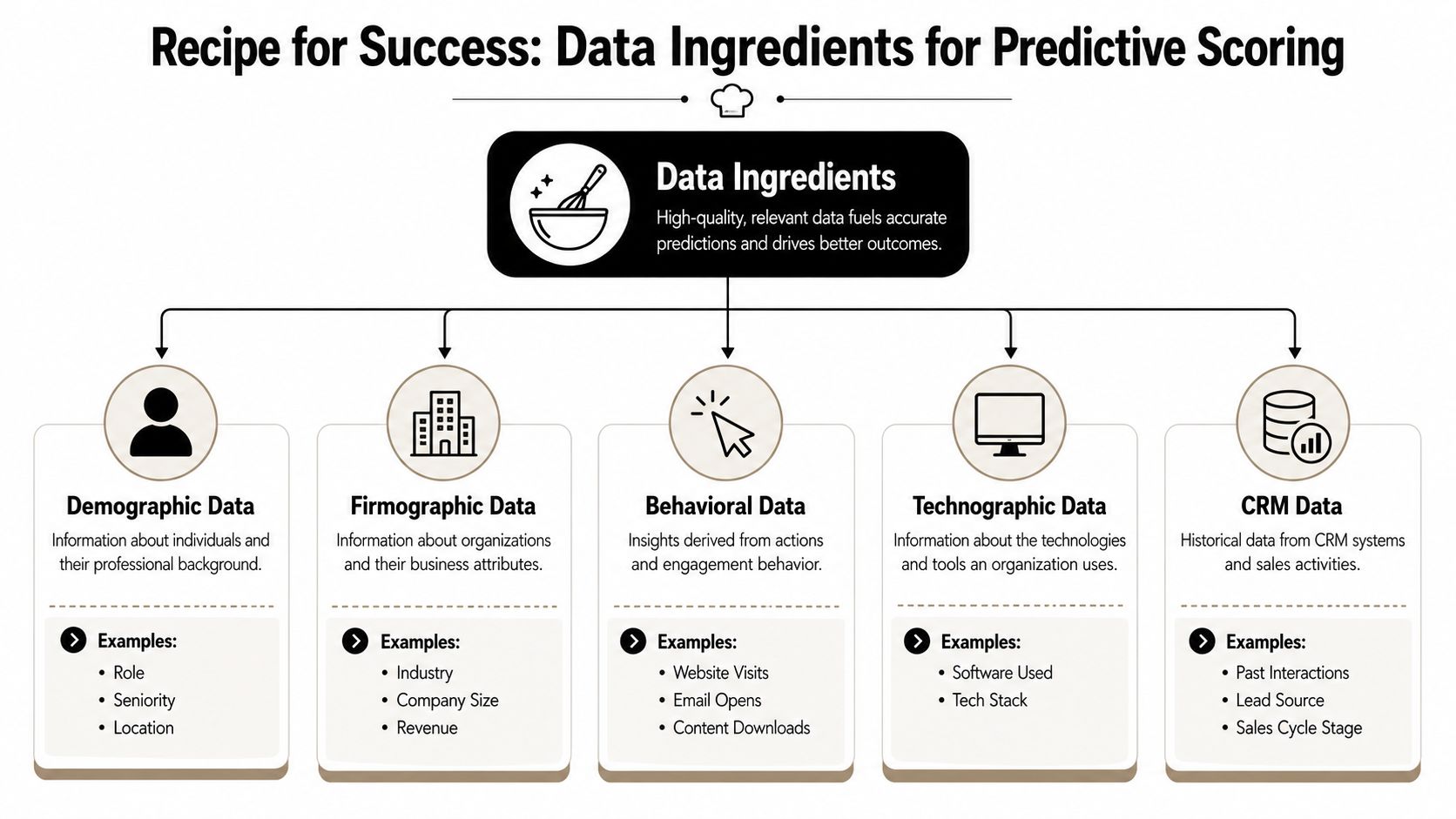
Start with your win and loss history
The most important ingredient is simple. Which past leads became customers, and which didn't?
If you use GoHighLevel, that means your opportunity stages need to be clean. Won should mean won. Lost should mean lost. If your pipeline is full of vague statuses like “maybe,” “estimate sent,” or “follow up later” with no final outcome, the system can't learn much.
You also need enough detail on the lead record itself. Project type, location, source, notes, timeline, and budget signals all help. If you want a cleaner way to think about the information you collect, this breakdown of demographic geographic psychographic and behavioral data is useful because it mirrors how strong qualification works.
What Google Ads Local SEO and your website can tell you
Your website behavior gives away intent faster than most homeowners realize.
Repeated visits to service pages can be a positive signal. Fast reply times can be a positive signal. Visits to job pages or unsubscribes can be negative signals. The point isn't that one action always means one thing. The point is that the combination tells the story.
For remodelers, the most useful behavior clues often come from:
- Service page depth: A homeowner who checks kitchen remodeling, additions, and your process page is showing stronger intent than someone who only reads one blog post.
- Portfolio behavior: Looking at multiple project galleries usually signals real interest in style, scope, and proof.
- Form detail: A long, specific form submission tends to be more useful than a vague “call me.”
- Google Ads context: The search term, ad group, landing page, and conversion path often say a lot about project intent.
- Local SEO source quality: A person coming from your map listing or branded search may behave differently from someone who found a top-of-funnel article.
Good scoring doesn't reward random activity. It rewards behavior that lines up with real revenue.
That's why I'd keep the model grounded in practical homeowner actions. Not vanity signals. Not busywork clicks. Real signs that someone is moving toward a serious remodeling decision.
A Remodeler's Playbook for Implementation
You don't need a huge enterprise stack to start using predictive lead scoring well. You do need discipline. For a local remodeler, the smartest setup usually starts with GoHighLevel as the system of record, then pulls in website and ad behavior so one lead record tells a fuller story.
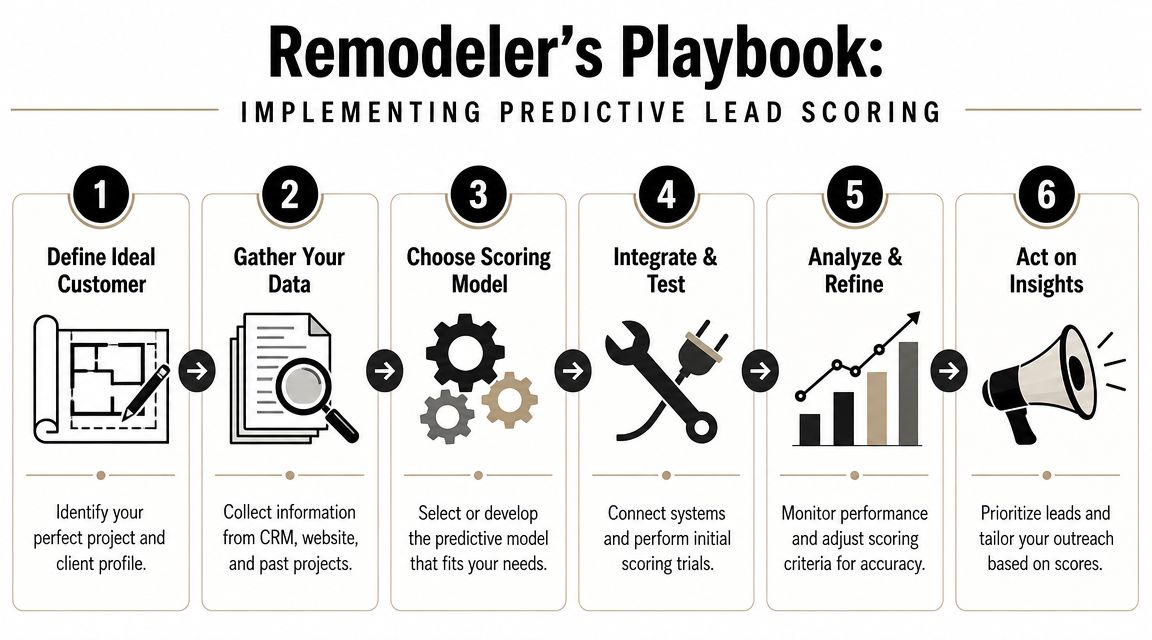
Phase one clean up your pipeline
Before you score anything, clean your data.
Go into GoHighLevel and fix your stages. Every closed lead should end up marked in a way that makes sense for analysis. If someone ghosted, lost. If they were out of area, lost. If they signed, won. Keep the categories simple enough that your team will readily use them.
This isn't glamorous work. It's the foundation.
If you're comparing systems or trying to tighten your current setup, this guide to CRM software for builders gives a practical view of how a contractor CRM should support sales, not just hold contacts.
Phase two connect your lead sources
Next, make sure your data flows into one place.
Your website should push form fills and key activity into GoHighLevel. Your Google Ads leads should carry source detail. Your Local SEO leads should be tagged clearly enough that you can tell whether they came from maps, branded search, or organic service-page traffic.
Many remodelers often get sloppy. They know a lead came from “the internet,” but that's not enough. You want context tied to the person record so later you can see which channels produced stronger opportunities.
A practical stack usually includes:
- GoHighLevel for pipeline and automation
- Google Ads conversion tracking tied to lead records
- Website form and call tracking connected to CRM
- Clear source and campaign naming rules
- Consistent outcome labels after the sales process ends
Phase three score route and act
Once your historical data is usable, you can start applying a model or a scoring logic.
Major CRM platforms have already made this concrete. Microsoft Dynamics 365 requires at least 40 qualified and 40 disqualified closed leads before training a model, and HubSpot's predictive model estimates the probability that open contacts will close within 90 days, as shown in HubSpot's documentation on predictive lead scoring and likelihood to close. That tells you two important things. First, these models rely on real past outcomes. Second, they're built to predict near-term action, not abstract interest.
For a remodeler using GoHighLevel, I'd keep the rollout simple:
- Create a score field tied to lead quality factors and outcomes.
- Group leads by score bands so your team knows what counts as urgent.
- Trigger an alert when a high-scoring lead comes in.
- Assign follow-up rules based on score, source, and service area.
- Review results monthly and adjust what the model rewards.
A score that nobody acts on is just decoration.
If a lead comes in from Google Ads, lands in your target zip code, views high-intent pages, and submits a detailed request, your lead salesperson should know fast. Text alert. Immediate task. Call first. That's where predictive scoring stops being a concept and starts becoming a sales weapon.
Sample Scoring Features and Key Metrics to Track
Most remodelers get stuck because “predictive lead scoring” sounds abstract. It doesn't have to be. Start with signals that reflect the type of work you want more of, then measure whether those signals show up in won jobs.
Salesforce gives a useful practical benchmark here. It recommends comparing each lead attribute's close rate against your overall lead-to-customer conversion rate, then assigning higher weight only to attributes that beat that baseline, as explained in Salesforce's guide to building lead scoring around conversion rates.
Signals worth paying attention to
Here's a simple example table for remodelers.
| Signal Type | Example Action or Data Point | Why It Matters |
|---|---|---|
| Positive | Visited multiple portfolio pages and a service page | Shows deeper project research, not casual browsing |
| Positive | Submitted a detailed form with project type and timeline | Gives your team stronger buying-context clues |
| Positive | Located inside your ideal service area | Improves fit before sales even makes contact |
| Positive | Came from a high-intent Google Ads landing page | Often signals active solution-seeking behavior |
| Positive | Replied quickly after inquiry | Suggests active engagement |
| Negative | Visited the careers page | May indicate job-seeking, not buying intent |
| Negative | Asked for a service you don't offer | Low fit from the start |
| Negative | Outside your target geography | Hard stop for many local firms |
| Negative | Used vague request language with no project detail | Often lower urgency or lower seriousness |
| Negative | Unsubscribed or stopped engaging early | Can signal falling interest |
Don't overbuild this. A few useful signals beat a giant messy spreadsheet every time.
The metrics that actually matter
You don't need a giant KPI dashboard. Track the handful of measures that tell you whether the score is helping.
- Close rate by score band: Do higher-scoring leads close more often than lower-scoring ones?
- Sales cycle length: Do the best-scored leads move faster from inquiry to signed job?
- Marketing quality by source: Are Google Ads or Local SEO producing stronger high-scoring leads?
- False positives: Which leads scored high but wasted your team's time?
- False negatives: Which leads looked weak but became great jobs?
If your score doesn't help you rank call priority, improve qualification, or shape ad spend, it needs work.
That's the standard. Not whether the model looks fancy. Whether it helps you run the business better.
Common Pitfalls and How to Stay on Track
The biggest mistake remodelers make with predictive lead scoring is thinking software will save bad process. It won't. A scoring model can sharpen judgment, but it can't fix messy CRM habits, lazy follow-up, or unclear service boundaries.

Bad data breaks good tools
If your team forgets to mark leads as won or lost, the model learns from fog. If your forms collect junk info, the score gets weaker. If your Google Ads leads and website leads are dumped together without source detail, you lose the context that makes prediction useful.
Keep your rules simple enough to enforce:
- Use clean close-out stages: Every lead should end with a clear outcome.
- Collect the same core fields: Project type, location, source, and service need to be consistent.
- Review garbage records often: Duplicates, blanks, and mislabeled leads should get fixed fast.
Your model can get stale
This is the other trap. Buyer behavior changes. Seasonality changes. Your offer changes. Your market changes.
Microsoft notes that predictive scoring often uses a two-year lookback, which assumes older patterns are still relevant. For remodelers in seasonal or shifting markets, that can create score drift, as discussed in Microsoft's documentation on configuring predictive lead scoring in Dynamics 365.
That means you should keep checking whether the score still matches reality.
A simple discipline works well:
- Review wins and losses regularly: Look for new patterns in your best jobs.
- Watch for changing lead mix: If Local SEO starts bringing one type of project and Google Ads brings another, your score should reflect that.
- Leave room for human judgment: A salesperson can spot nuance a model may miss.
Trust the score enough to prioritize. Don't trust it so much that you stop thinking.
Used right, predictive lead scoring becomes another tool in the belt. Not the boss. It helps your team move faster, qualify smarter, and protect time for the jobs you want.
If you want a marketing system that connects Google Ads, Local SEO, your website, and GoHighLevel into one lead pipeline built for serious remodeling projects, Constructo Marketing is worth a look. They focus on helping remodelers attract better-fit local leads, track what happens after the lead comes in, and build a process that supports higher-value jobs instead of more noise.